White, pink and brown noise: what they are and how they’re used in audio
White, pink and brown noise all contain every audible frequency at once, and the color says how the level is spread across them. White noise is flat, pink noise falls 3 dB per octave and brown noise falls 6 dB per octave. That is why white sounds hissy, pink sounds even and brown sounds like a low rumble. In audio work, pink noise is the one engineers reach for, as a test signal and a level reference.
This guide explains the three colors in octaves, the way you hear them, and puts the numbers in one table. Then it covers four jobs noise does in a studio, from calibrating speakers and balancing a mix to sound design and dither. Each job comes with a free way to generate the noise.
Noise tools and sound-design packs on MuseHub


What are white, pink and brown noise?
White noise has equal power at every frequency, pink noise has equal power in every octave, and brown noise loses power faster still as the frequency rises. All three are random signals with no pitch, so they differ only in tone color.
The names come from a loose analogy with light. White light mixes every visible color, and red sits at the low-frequency end of the spectrum, so noise weighted toward the bass became pink and, further down, red. Brown comes from Brownian motion instead, the random drift of particles named after the botanist Robert Brown. You can make brown noise by integrating white noise (adding up its samples as you go). Brown and red are two names for the same noise.
Why each color sounds the way it does
We hear pitch in ratios. Each time a frequency doubles, the pitch rises by one octave, so 110, 220 and 440 Hz are three A’s an octave apart. The range from 20 Hz to 20 kHz spans about ten octaves, and every octave is twice as wide in hertz as the one below it. That doubling is what separates the three colors.
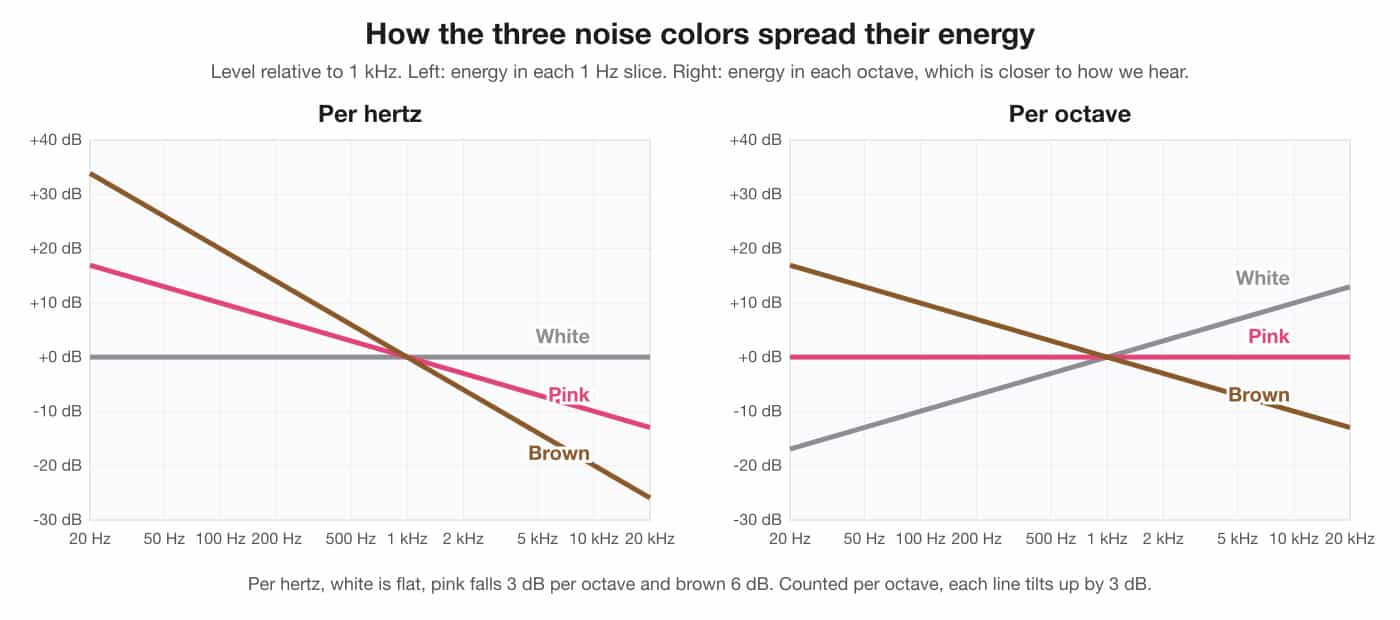
The chart draws the three colors two ways: the energy in each hertz, and the energy in each octave, which is closer to how we hear.
White noise
White noise puts the same power into every hertz. The top octave, 10 to 20 kHz, is 10,000 Hz wide, while the bottom octave, 20 to 40 Hz, is only 20 Hz wide. So the top octave of white noise carries 500 times the power of the bottom one, about 27 dB more. Most of what you hear is treble, landing where the ear is most sensitive (roughly 2 to 5 kHz) and above. The result is the bright hiss of an untuned radio.
Here are ten seconds of white noise, at the same level as the pink and brown clips below. Listen for the bright hiss that sits on top of everything.
White noise
Pink noise
Pink noise falls by 3 dB per octave for each hertz, which exactly cancels the doubling of each octave’s width. Every octave therefore carries the same energy, so the band from 40 to 60 Hz holds as much power as the band from 4,000 to 6,000 Hz. Because the ear groups pitch by octaves, pink noise sounds balanced from bass to treble, a bit like steady rain. Audacity’s manual puts it the same way, saying pink noise has equal power per octave, “which is closer to how we hear”.
The same level in pink noise. Listen for the hiss stepping back and the sound evening out, closer to steady rain.
Pink noise
Brown noise
Brown noise falls by 6 dB per octave for each hertz. Even after the doubling, each octave holds 3 dB less than the one below, so the energy piles up in the bass. It sounds like a deep rumble or distant surf, with almost no hiss on top.
And brown noise at the same level. Listen for how little is left above the low rumble.
Brown noise
Noise colors are also sold as sleep and focus aids, and a 2021 systematic review in Sleep Medicine Reviews rated the evidence that continuous noise improves sleep as very low quality.
White, pink and brown noise compared
| Noise | Level per hertz | Energy per octave | Sounds like | Typical audio use |
|---|---|---|---|---|
| White | Flat | Rises 3 dB per octave | Bright hiss, like an untuned radio | Raw material for risers, hi-hats and snares |
| Pink | Falls 3 dB per octave | Equal in every octave | Even, like steady rain | Speaker and room checks, monitor calibration, mix balance reference |
| Brown (red) | Falls 6 dB per octave | Falls 3 dB per octave | Low rumble, like distant surf | Wind, surf and low ambience beds |
The two middle columns are why spectrum displays disagree. An analyzer that shows octave or third-octave bands draws pink noise as a flat line and white noise as a line rising to the right. An analyzer that plots every hertz on a linear scale draws white noise flat and pink noise falling. Both displays show the same noise on different scales.
Noise you add and noise you remove
White, pink and brown noise are signals you add on purpose. The noise already in a recording, such as fan hiss, air conditioning, mains hum or a noisy preamp, is the opposite problem, and the tools for it work differently. Audacity’s Noise reduction effect learns a profile from a moment of noise-only audio and subtracts it, as the guide to removing background noise in Audacity shows step by step. The ARNOISE plugin does the same inside a DAW (digital audio workstation), learning its profile from a second of isolated background noise.
Pink noise as a test signal
A test signal needs to be steady, repeatable and spread across the whole range, and pink noise is all three. Because every octave carries equal energy, a meter or a pair of ears hears the bass and the treble at a similar level. A speaker that adds or loses an octave shows up as a lump or a dip.
Before you measure anything, check the basics. The free Speaker Test plays a chime on the left, the right and both speakers, then runs a bass sweep from 30 to 250 Hz and a full sweep from 20 Hz to 20 kHz. That catches swapped channels, reversed polarity and rattles at one frequency before you trust a level reading.
Calibrating monitor level with pink noise
Mixing at the same loudness every day makes your decisions repeatable. Mastering engineer Bob Katz describes a method based on the standard of the Society of Motion Picture and Television Engineers (SMPTE). It needs pink noise and a sound level meter or an SPL (sound pressure level) meter app.
- Play pink noise through one speaker. Set it to −20 dBFS RMS, the average level in decibels below digital full scale, read on an RMS meter rather than a peak meter.
- Measure at your listening position. Set the meter to C weighting, which is much flatter in the bass than A weighting.
- Turn the monitor control until the meter reads 83 dB SPL. The cinema standard from Dolby uses 85 dB SPL with pink noise at −18 dBFS RMS, which is the same monitor gain.
- Repeat on the other speaker. Katz’s tolerance is half a decibel between the two.
- Mark the knob position. It becomes your 0 dB reference. Katz also marks quieter positions in 1 dB steps below it, down to −12.
For step 1 you need noise in one speaker at a known level. The Tone Generator plays the same signal on both channels, so download its pink noise as a WAV and put it on a track in your DAW. Pan it hard left, then hard right, and trim the clip gain until the RMS meter reads −20. Inside a DAW, the free ARGEN plugin can send its pink noise to the left or right channel only.
Mixing against pink noise
Pink noise also works as a reference for a first balance. Eddie Bazil described the method in Sound On Sound in December 2014.
- Put a pink noise generator on the stereo bus at a moderate level, leaving headroom.
- Leave the channel faders at unity and do the balancing with input or clip gain.
- Solo one track at a time and raise its gain until you can just hear it above the noise, no louder.
- Bypass the noise when every track is done, then pan, add effects and refine.
The trick works because pink noise sounds equally loud across the range, so every source is judged against the same reference. The result is a rough static balance. Sub-heavy kicks can seem buried in the noise, and hi-hats need the same care, so resist boosting either to compensate. Judge a vocal by a whole line rather than its loudest word. Pink noise cannot tell you how to EQ or compress, so the finished mix still needs your ears.
Noise in sound design
Noise is raw material for sound design. Try these recipes with a synth’s noise source, an audio editor or a downloaded noise file.
- Riser. White noise through a band-pass or high-pass filter whose cutoff climbs over four or eight bars, with the volume rising alongside it.
- Snare. Roland’s TR-808 snare combines two decaying oscillators with a shaped burst of noise, as Gordon Reid’s Synth Secrets series in Sound On Sound sets out. To build one, layer a short, decaying tone with a burst of filtered noise and balance the two by ear.
- Hi-hat. A very short burst of white noise through a high-pass filter gives a simple closed hat; lengthen the decay for an open one.
- Wind. Pink or white noise through a resonant low-pass or band-pass filter, with the cutoff drifting slowly up and down for gusts.
- Surf. Brown or pink noise through a low-pass filter, with the volume swelling and falling every few seconds.
Here is the riser from the first recipe: white noise through a high-pass filter that climbs from 150 Hz to 8 kHz over eight bars at 120 BPM, with the volume rising alongside it. Listen for the hiss thinning and brightening as it climbs.
White noise riser, 8 bars
When you would rather start from finished sounds, a sample pack skips the synthesis. Risers & Fallers FX from Wavetick holds rising and falling synth whooshes and uplifters for transitions. For darker work, the roundup of horror sound effects packs covers drones, stingers, risers and impacts.
Dither, the noise added at export
When a 24-bit master becomes a 16-bit file, every sample is rounded to fewer steps. Without help, the rounding error follows the music and turns into a gritty distortion on quiet fades and reverb tails. Dither adds a very low level of noise before the rounding, so the error becomes a steady, faint hiss instead.
The common recipe is TPDF dither, named after its triangular probability density function, spanning one step either side of the last bit. That shape keeps the hiss steady, so it does not pump up and down with the music. Noise-shaped dither moves more of the noise into the top octaves, where the ear is less sensitive. Many early dither schemes for digital audio used violet noise, which rises 6 dB per octave and so sits mostly in the treble. Shaping makes the noise less audible without making it smaller.

ARDITHER is a free dither plugin with TPDF and shaped modes, output at 24, 20, 16, 12 or 8 bits, and an AUTO BLANK switch that keeps digital silence silent between tracks. It is built to sit last in the chain, immediately before export.
How to generate white, pink and brown noise
You can generate all three colors for free, in a browser, in Audacity or inside a DAW. Noise is louder than its level suggests, because it fills every frequency at once, so start with the volume low.
- In a browser. The Tone Generator plays white, pink and brown noise alongside its tones. Pick a color, press Play and raise the volume slowly. It can also save 5, 10 or 30 seconds as a WAV file (16-bit, 44.1 kHz, mono, peaking at about −6 dBFS), free and with no sign-up.
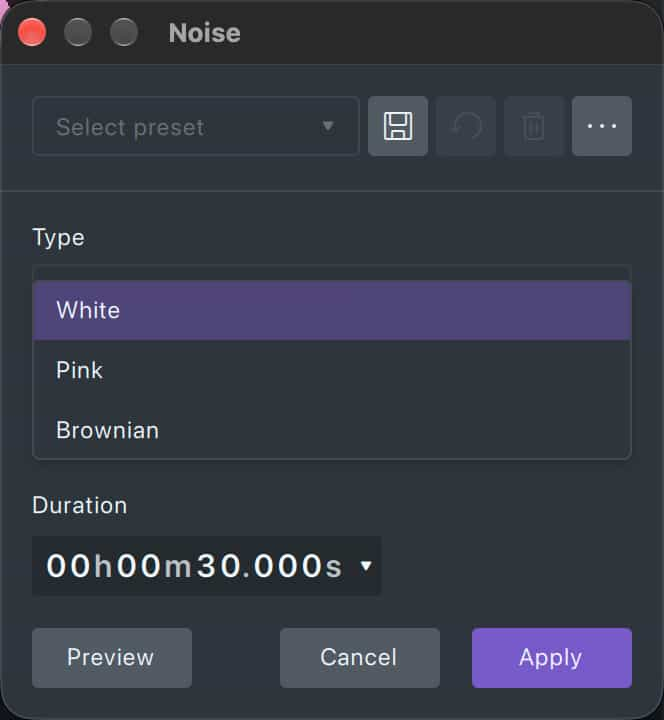
- In Audacity 4. Choose Generate ▸ Noise, pick White, Pink or Brownian as the type, and set the Amplitude, 0.8 by default, where 1 is full scale. To shape the result into wind or a riser, the high-pass and low-pass filters are under Effect ▸ EQ and filters, covered in the Audacity equalizer guide.
- In your DAW. ARGEN generates white and pink noise, a sine, a logarithmic sweep from 20 Hz to 20 kHz and a one-sample impulse. It routes them to both channels, one side only, or mid or side, and passes your audio through untouched when stopped.
The Audacity 4 route is a single window, Generate ▸ Noise, with White, Pink and Brownian under Type.


FAQ
Next step
Once a balance holds up against pink noise, the next stage is the master. How to master a song walks through the chain from gain to limiter, and the free LUFS Meter measures the loudness and true peak of the bounce. Get ARGEN, ARDITHER, Audacity and the rest in one place — download MuseHub free.