Best free autotune plugins in 2026
The best free autotune plugin in 2026 is Graillon 3, a real-time pitch corrector from Auburn Sounds that gives a natural fix or the hard-tuned effect and installs free from MuseHub. Nine more free options follow, so you can match the tool to your DAW and to how obvious you want the tuning to sound.
Free autotune comes in two forms. A plugin tunes the vocal inside your session as it plays. An online tool takes an uploaded file and sends back a tuned one. This guide covers both, then ranks ten free plugins by how clean they sound, how quickly a beginner gets a result and where each one falls short. Our roundup of the best autotune plugins adds the paid options.
Free pitch correction on MuseHub


Top picks at a glance:
- Best overall: Graillon 3, natural and hard-tuned correction plus pitch and formant shifting.
- Best for transparent correction: MAutoPitch, with key, scale, depth and formant controls.
- Simplest to set up: Pitch Perfekt, set the key and go.
- Best for the hard-tuned sound: GSnap or Spoton, built around the snapped, robotic effect.
- Best online: a browser tuner, when you only need to fix one clip.
How we choose: we rank on how clean the correction sounds, how fast a beginner gets a result and what each plugin leaves out. Every pick has a free version you can use on a real project.
What free autotune can and cannot do
“Autotune” as a search means pitch correction in general. Auto-Tune is Antares’ trademarked product, and plenty of other plugins do the same job. Pitch correction detects the note a singer is on and moves it toward the nearest note that belongs in the song’s key.
Every free tool in this list works in real time. It tunes the audio as it plays, with no screen that draws each note for you to nudge by hand. That is the main thing you give up against a paid graphical editor such as Melodyne. It is also why a dry, single-voice take matters, because the detector follows one pitch at a time, so harmonies, reverb and backing-track bleed make it guess.
Two settings decide how the result sounds. The retune speed is how fast a note jumps to its target. Fast gives the snapped, robotic effect, and slow keeps the natural slide of a real voice. The key, or scale, is the set of notes the tuner may move you to. Set it from the song’s chords and most wrong-note surprises disappear.
The 10 best free autotune plugins
1. Graillon 3

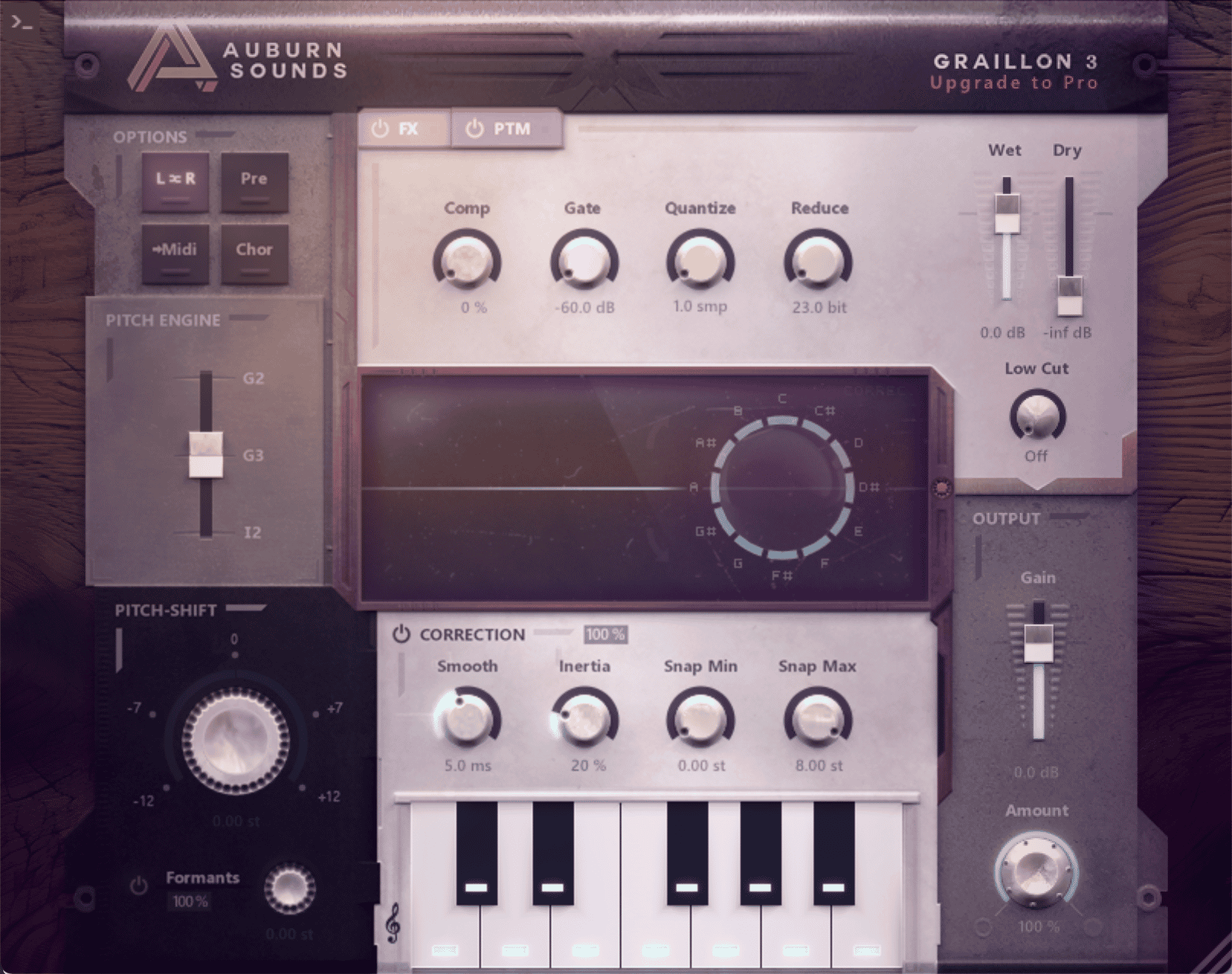
Graillon 3 is a real-time vocal tuner from Auburn Sounds. Real-time means it detects pitch as the audio plays and pulls each note toward the nearest allowed one. The free edition covers natural and hard-tuned correction, a pitch shifter, a formant shifter and a small chain of vocal effects, with three pitch engines to choose from. The paid Full Edition adds per-note tuning, a vocal doubler and pitch-tracking modulation, none of which you need to start. Bedroom Producers Blog and Tracklib both rank it first in their free-autotune lists. It is the one to try if you want a single tuner for a quiet fix and a robotic hook. The screenshot shows the plugin with correction switched on at full strength.
2. MAutoPitch
MeldaProduction’s MAutoPitch is one of the most complete free correctors. It has key and scale selection, adjustable depth and retune speed, and a formant shift control that keeps a voice natural under heavier tuning. A stereo-widening and detune section thickens a part when you want it. Its interface has more going on than Graillon’s, which helps if you like to dial the correction in and slows a beginner down. It runs on Windows and macOS, and it is the strongest free choice when you want transparent correction and a second opinion next to Graillon.
3. Pitch Perfekt

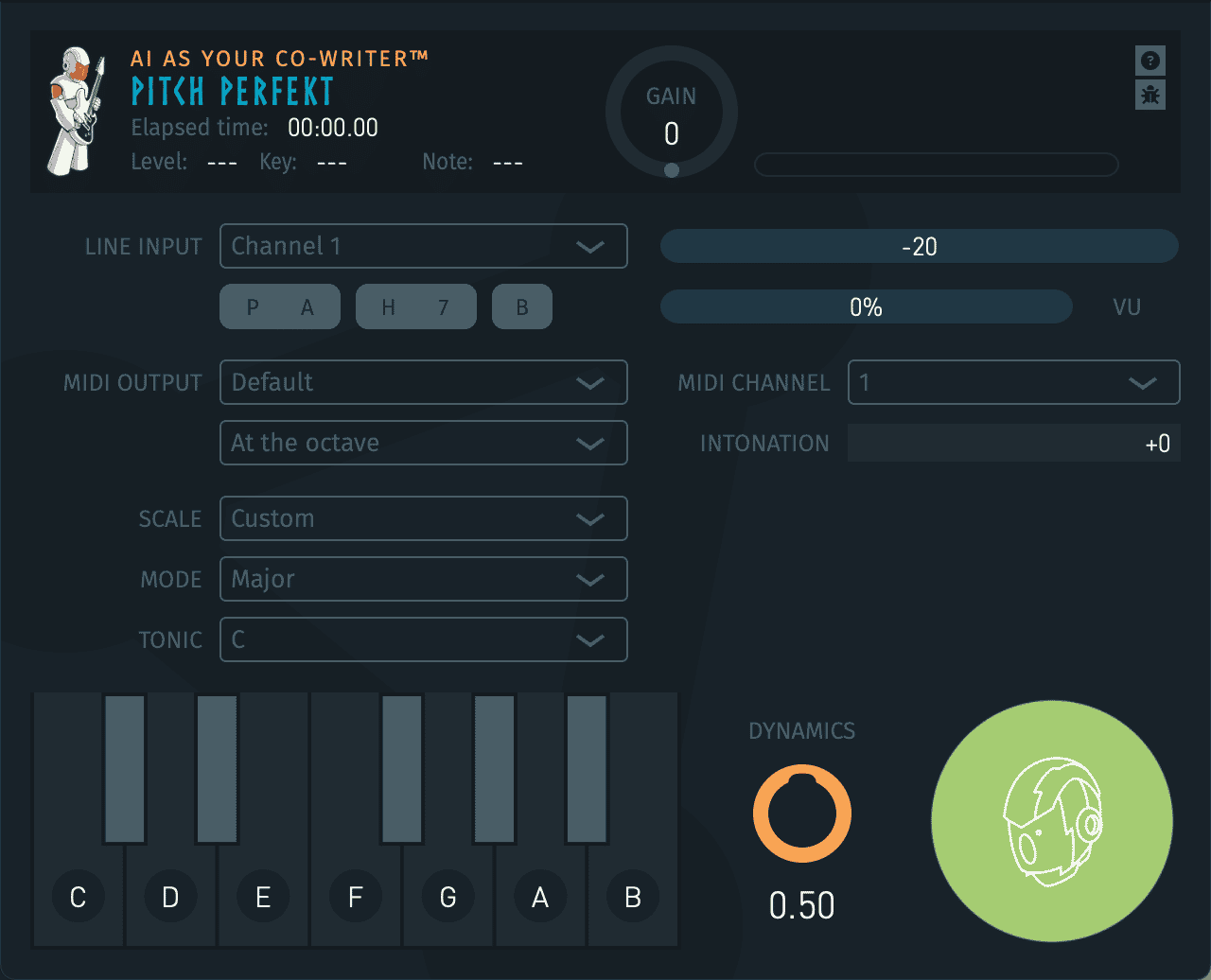
Pitch Perfekt takes the “never hit a wrong note again” approach. You set the key and it corrects in real time, without a wall of parameters to learn first. Push the retune speed up for the snapped modern effect, or ease it back for a gentler fix that keeps some natural movement. Because there is less to misconfigure than on a deeper tool, a beginner gets a usable, in-tune vocal in minutes. It installs from MuseHub in one click, which makes it the easiest first tuner on this list. The screenshot shows the key set to C Major.
4. Pitch Fix in MuseFX

Pitch Fix is the real-time correction inside MuseFX, Muse Group’s free effects collection. It works on single-voice vocals and gives you one large knob for the amount of correction, plus presets you step through with arrows, starting with All-rounder. It has no key or scale selector, so you cannot tell it which notes are allowed. That makes it the quickest way to pull a vocal in tune with nothing to set, and the wrong tool when a song needs a specific key.
5. GSnap
GSnap is the free tuner that older guides all show. It snaps a single voice to the notes you tick on a small keyboard, or to notes you play over MIDI, and at its fastest setting it gives the classic robotic hard-tune. It handles one voice at a time. GVST lists only a VST build, with no VST3 version, so it loads in many DAWs but not in hosts that dropped VST2, including Audacity 4. If your host loads it, it is a light, no-cost way to learn how correction behaves.
6. Spoton
Sixth Sample’s Spoton is a simple, fast and completely free corrector, and Bedroom Producers Blog calls it excellent for aggressively tuned vocals. It is built to get you to the hard-tuned sound without learning scales and retune curves first. Use it for the effect-heavy hook, and keep a gentler tuner such as Graillon 3 or KeroVee for lead vocals that must sound untouched. It is a good second plugin rather than a first one.
7. KeroVee
KeroVee, made by Japanese developer g200kg, is a free corrector that focuses on precise pitch adjustment instead of the robotic effect. That makes it a sensible starting point when the goal is to fix notes without anyone noticing. It is the quieter counterpart to Spoton and GSnap, and it fits a lead vocal that already sits close to the right notes. Pair it with a hard-tune plugin when one song needs both a clean verse and a snapped hook.
8. TrapTune Free Edition
UnitedPlugins’ TrapTune Free Edition is the freeware, lightweight version of the full TrapTune pitch correction software. It lets you try the TrapTune workflow before deciding whether the full edition earns a place in your chain. Expect fewer features than the paid version, since it is the cut-down edition. It suits a producer who wants to hear the tool on their own vocals first and is already leaning toward trap-style tuning.
9. AutoTune Go
AutoTune Go is the entry point to Antares’ product line, built for fast real-time correction, and it can be upgraded to the full Auto-Tune later. It is free for every FL Studio user. If you work in FL Studio, it is the original brand’s sound at no cost, and the upgrade path is clear if you outgrow it. Outside FL Studio, treat it as a taste of Antares rather than a free download for everyone.
10. Voloco
Voloco started as a phone app and grew into a real-time tuner with effects, popular for fast vocal ideas. It corrects pitch to a key and stacks vocoder-style harmonies on top, so a rough idea sounds produced in seconds. It is free to start, with paid tiers. It is aimed at speed rather than the control of a studio plugin, so it works best as a sketchpad for catching a hook before it is gone.
A free pitch tool that is not a tuner

Inner Pitch 2 from Auburn Sounds is free on MuseHub, but it is a pitch shifter and harmonizer, not a corrector. Reach for it when the pitch move is the effect, such as stacked intervals, octave-doubled hooks and pitched textures. Pair it with one of the tuners above for the clean-up, and let Inner Pitch 2 handle the ear-catching moves.
Free online autotune, or a plugin?
If you only need to fix one clip, a browser tool is quicker than installing anything. Audimee and Kits AI both offer a free online tuner. You upload a file and download a tuned version. The trade-off is that you tune a finished clip rather than the vocal in your session, so in most cases you cannot change the key or the speed once you start mixing. A plugin stays editable until you export, and it runs while you record, so a singer can hear themselves in tune.
How to choose
Start from the sound you want. For a natural fix, choose Graillon 3, MAutoPitch or KeroVee and slow the retune speed down. For the hard-tuned effect, choose Graillon 3, GSnap or Spoton and set the retune speed to its fastest. If you want no settings at all, Pitch Fix in MuseFX and Pitch Perfekt are the lowest-effort options. Check the plugin format your DAW loads before you download, because a VST2-only plugin such as GSnap will not appear in a VST3-only host. Once the pitch is right, mixing vocals covers the EQ, compression and space that make the take sit in the song.
Comparison table
| Pick | Type | Price | Best for |
|---|---|---|---|
| Graillon 3 | Real-time tuner and voice effects | Free | One tuner for natural and hard-tuned results |
| MAutoPitch | Real-time tuner | Free | Transparent correction with formant control |
| Pitch Perfekt | Real-time tuner | Free | The easiest first tuner |
| Pitch Fix (MuseFX) | Real-time tuner, no key setting | Free | Quick fixes with nothing to set |
| GSnap | Real-time tuner, MIDI mode | Free | The classic robotic effect |
| Spoton | Real-time tuner | Free | Aggressive hard-tuned hooks |
| KeroVee | Real-time tuner | Free | Precise, unobtrusive correction |
| TrapTune Free Edition | Real-time tuner | Free | Trying TrapTune before the full edition |
| AutoTune Go | Real-time tuner | Free in FL Studio | The Antares sound in FL Studio |
| Voloco | Tuner and effects | Free to start | Fast idea capture |
FAQ
Next steps
- Want the paid options too? Read the best autotune plugins.
- Building the whole chain, not just the pitch? See the best vocal plugins.
- Working in Audacity? How to autotune in Audacity sets up Graillon 3 there.
- Browse more effects in the MuseHub plugins catalog.
Get Graillon 3 and the other free pitch tools in one place. Download MuseHub free and try them on your own vocal.