How to use a formant shifter on vocals
To use a formant shifter on vocals, insert it on the vocal track, play the loudest section and move the formant control a small amount up for a brighter, smaller-sounding voice or down for a darker, larger one. The pitch stays where it was, because formants and pitch are separate qualities of a voice.
Formants are the resonant peaks in a voice that come from the shape of the throat, mouth and nose. They give a voice its timbre, the quality that lets you tell two singers apart on the same note. Graillon 3, a free plugin from Auburn Sounds, includes a formant shifter, so you can try this in your DAW at no cost.
This guide covers what formants are, what you need, how to set a formant shifter step by step, example settings for common goals, and the mistakes that make a shifted vocal sound artificial.
Pitch and voice tools on MuseHub

What formants are
When you sing, your vocal cords make a pitch and your throat and mouth shape the sound. The shape boosts certain frequency bands, and those boosted bands are the formants. A larger vocal tract gives lower formants and a deeper-sounding voice. A smaller one gives higher formants and a lighter voice.
Pitch shifting moves everything together, so a voice shifted up a lot starts to sound like a cartoon character. A formant shifter moves only the resonances. That lets you make a voice sound bigger or smaller, or keep a voice natural after you move its pitch.
What you need
- A DAW that loads VST, AU or AAX plugins. Check that Graillon 3 is listed in the format your DAW uses.
- Graillon 3, free from MuseHub. MuseHub is free for Windows and macOS and installs plugins into the folders your DAW scans.
- A dry vocal. A recording without reverb or delay gives the shifter a clean signal to work on.
- Headphones, so you can hear small timbre changes.

Step 1: Install Graillon 3 from MuseHub
Open the Plugins section in MuseHub, find Graillon 3 and install it. Restart your DAW or rescan its plugins if Graillon 3 does not appear in the list.
Step 2: Insert it on the vocal track
Put Graillon 3 as an insert effect on the vocal track, before reverb and delay. Shifting formants before the time-based effects keeps the room sound natural, because the reverb is applied to the already shifted voice.
Step 3: Find the formant controls
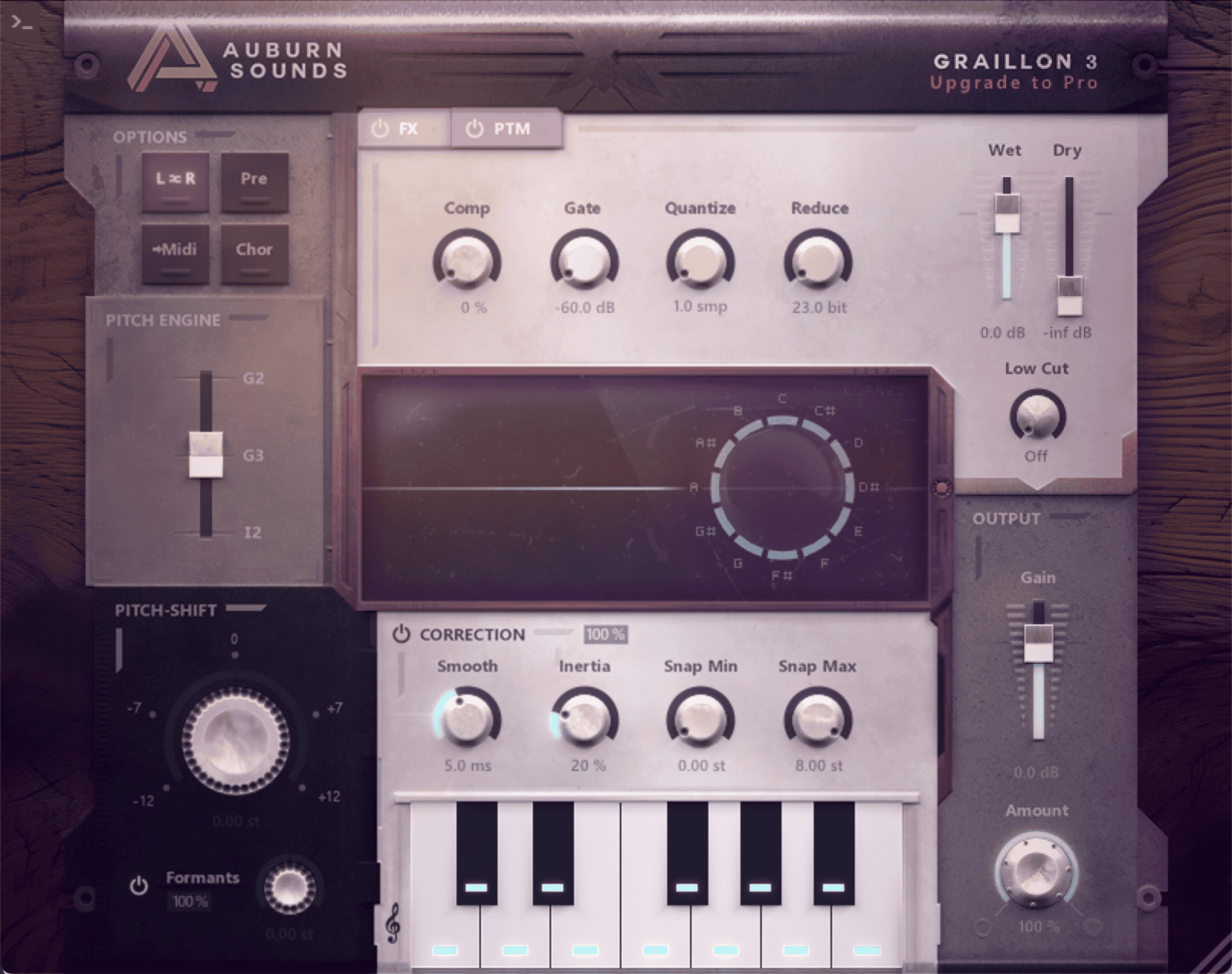
In Graillon 3 the formant section sits under the Pitch-Shift knob and is labelled Formants, with a power switch. Beside the switch is an amount, and next to it a knob that reads in semitones. Switch Formants on, and use the knob to move the formants up or down. Leave Pitch-Shift at zero while you work on timbre, so only the character of the voice changes. The screenshot shows the section with Formants on and the knob at zero.
Step 4: Move the formant knob in small steps
Play the loudest part of the song on a loop. Move the formant knob a little in one direction and listen to the vowels. Small moves change the character of the voice. Large moves are for effects and for characters.
- Up makes the voice sound brighter, lighter and smaller.
- Down makes it darker, heavier and larger.
Step 5: Match the voice to the part
Compare the shifted vocal with the original by switching the plugin on and off at the same volume. A louder version always sounds better, so level-match the comparison. Keep the setting that serves the song rather than the one that sounds most different.
Step 6: Combine it with pitch only when you need to
If you also shift pitch with the Pitch-Shift knob, keep Formants on so the voice holds its natural timbre. If the result sounds harsh, lower the amount beside the switch. A voice moved up several semitones tends to sound thinner, and a small formant move down can restore some weight. The best autotune plugins covers the pitch-correction side.
Example settings for common goals
The amounts below are starting points to adjust by ear, because every voice is different.
| Goal | Formant knob direction | Size of move |
|---|---|---|
| Make a voice sound a little brighter | Up | Small |
| Give a thin voice more weight | Down | Small |
| Keep a pitched-up vocal natural | Formants on, small move down if thin | Small |
| Make a voice sound like a different character | Up or down | Large |
| Disguise a voice | Either way | Medium |
Common mistakes
- Moving too far. Past a certain point, vowels turn hollow or cartoonish. Back off until the words sound human again.
- Shifting a wet vocal. Reverb and delay on the recording get shifted too and sound wrong. Shift the dry take.
- Comparing at different volumes. A louder version sounds better, so match levels before you decide.
- Fixing pitch with the formant control. Formants change timbre. If the singer is out of tune, use pitch correction.
Pro tips
- Automate the formant knob for one section, such as a chorus, to make a voice feel bigger without changing the pitch.
- Shift backing vocals by a different amount from the lead so the layers sound like different singers.
- Pair it with EQ afterwards. How to EQ vocals covers the tone shaping that comes next.
FAQ
Next steps
- Tune the pitch as well with the best free autotune plugins.
- Shape the tone with how to EQ vocals.
- Put the whole chain together in mixing vocals.
- Browse more in the MuseHub plugins catalog.
Get Graillon 3 free. Download MuseHub free and try a formant shift on your own vocal.