Harmonic mixing: how to mix songs in key as a DJ
Harmonic mixing is the DJ technique of playing tracks back to back in the same or closely related keys, so the notes of both songs fit together while they overlap. Two tracks at the same tempo can still sound wrong together when their bass lines and chords come from different scales. Choosing the next track by its key as well as its tempo avoids that clash.
This guide explains why related keys blend, how Camelot codes turn 24 keys into numbers, and which moves DJs make between them. It then walks through a set from tagging the library to the transition itself, with free browser tools and the free DJ app Mixxx, and shows how a tempo change moves a track’s key.
DJ software and filters on MuseHub

Why two tracks clash in a mix
A song’s key is a home note plus a scale of seven notes, major or minor. A minor uses the white keys of a piano and keeps returning to A. With 12 home notes and two scale types there are 24 keys.
During a blend, both tracks play at once. If they share a key, every note of one track belongs to the scale of the other, and the overlap sounds like one piece of music. If their keys are far apart, the bass lines rub against each other and the chords turn sour, even though each track is perfectly in tune on its own.
Two piano loops show the difference. Each clip starts with a loop in A minor, 8A, at 120 BPM and crossfades over eight seconds into a second loop. In the first, the new loop is in E minor, 9A, one step away. Listen to the middle of the blend: the chords change, and nothing sounds wrong.
8A into 9A
In the second, the new loop is in E♭ minor, 2A, six steps away. Listen to the same stretch: while both loops play, the chords rub against each other and sound sour.
8A into 2A
So a DJ who mixes in key checks two numbers before choosing the next track, the tempo and the key. The tempo makes the beats line up. The key decides whether the music on top of the beats fits.
To get a key, run the file through a key finder or read the tag your DJ app wrote. The by-ear method, with chords and scales, is in how to find the key of a song.
Why related keys blend
Keys are related by how many notes they share. C major and G major share six of their seven notes; only F becomes F♯. Any two keys a fifth apart (seven semitones) differ by that one note, so a blend between them changes very little.
The circle of fifths arranges the 12 major keys so that each one sits a fifth away from its neighbors. Each step around the circle changes one note. Keys on opposite sides of the circle share only a couple of notes, which is why they clash.
Every major key also has a relative minor that uses exactly the same seven notes with a different home note. C major and A minor are a pair; so are G major and E minor. Switching from one to the other keeps every note and changes the mood, usually from bright to darker or back.
Camelot codes and other key notations
Key names such as “F♯ minor” are slow to compare in a dark booth. The Camelot system, a trademark of Mixed In Key, puts the circle of fifths on a clock face. Each key gets a number from 1 to 12 and a letter, A for minor and B for major. A minor is 8A, and its relative major, C major, is 8B.
On that clock, keys with the same number are relative major and minor, and keys one number apart on the same ring are a fifth apart and share six notes.
Other apps label the same wheel differently. Traktor uses Open Key, where C major is 1d and A minor is 1m. Mixxx can show keys in Lancelot notation, which uses the same numbers and letters as Camelot, so A minor is 8A there too.
To see the compatible keys of any code, open the Camelot Wheel and click a key. It lights up the keys that mix with it and names each move.
The moves, from a single key
The table lists the moves DJs make from one key to the next, starting from 8A, A minor.
| Move | From 8A to | Notes that change | Use it for |
|---|---|---|---|
| Same code | 8A, A minor | None | Long blends, a vocal over another track’s chords |
| One number up or down | 9A, E minor, or 7A, D minor | One | Most transitions in a harmonic set |
| Letter switch | 8B, C major | None | A change of mood with the same notes |
| Diagonal | 9B, G major | One | A mood change plus a step, tested by ear first |
| +2 energy boost | 10A, B minor | Two | A lift in energy, a whole step higher |
| +7 energy boost | 3A, B♭ minor | Five | A sudden semitone lift, on a cut or a short transition |
On the Camelot Wheel, 8A lights up the same moves, apart from the diagonal, which the wheel does not highlight.
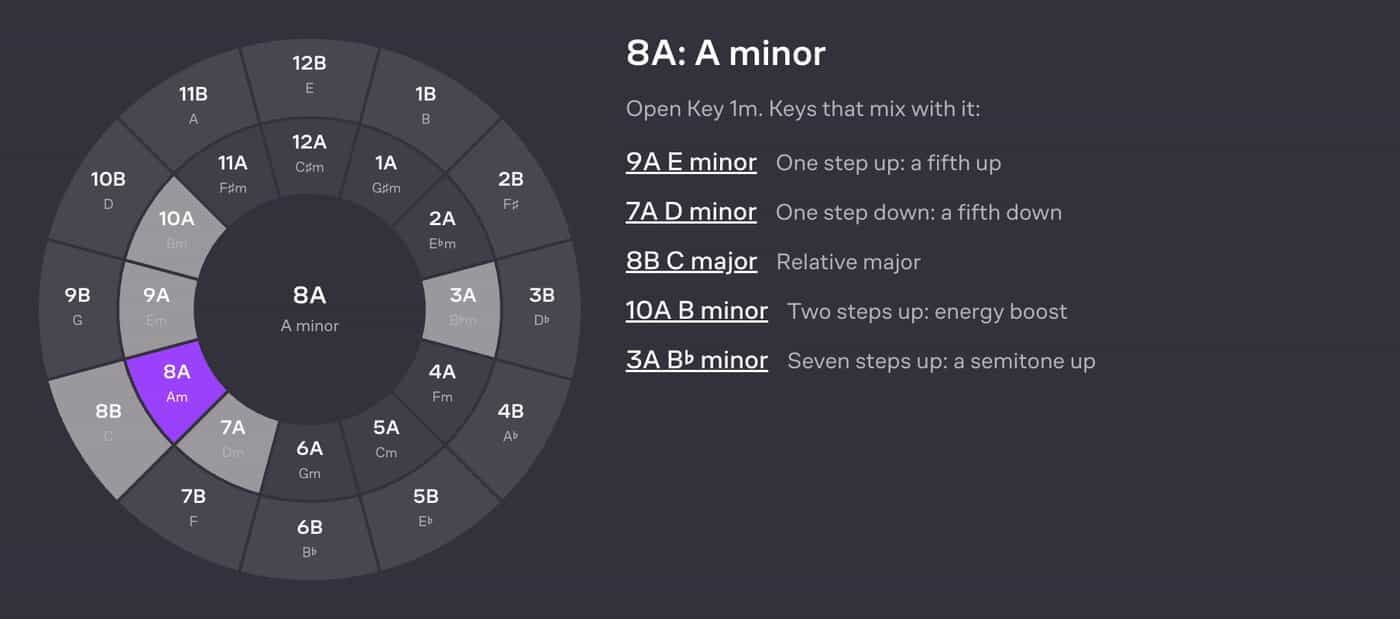
One number up or down is the move most harmonic sets are built from. Going up a number tends to sound like a lift, and going down like settling, because the new key sits a fifth above or below.
The two energy boosts break the one-note rule on purpose. +2 raises the key by a whole step and changes two notes, so the rise is easy to hear. +7 raises the key by a semitone, the key change heard when a pop song lifts its last chorus. Five notes change, so a long overlap will clash, and the move works only when the tracks barely play together.
How to mix in key, step by step
- Tag the key of every track. DJ apps such as Mixxx detect keys when they analyze the library. For a single file, drop it into the Key Finder. It reads MP3, WAV, FLAC, M4A and OGG files in your browser, with nothing uploaded, and shows the key, its Camelot code, the relative key and a confidence level.
- Tag the tempo. The BPM Finder reads a file’s tempo to a tenth of a BPM and shows the half-time and double-time readings, so you can tell a 140 BPM track from a 70 BPM one.
- Show keys as codes and sort by them. In Mixxx, choose Lancelot under Key Notation in the Key Detection preferences. Sorted by code, tracks in neighboring keys sit next to each other in the library.
- Plan the route. Chain one-number moves and letter switches, and place a +2 where you want the room to lift. A run such as 8A, 9A, 9B, 10B and then 12B changes one note at a time until the boost.
- Check the risky pairs in headphones. Key detection reads the notes that dominate a recording, and it can be wrong. Its errors usually land on the relative key or a neighbor a fifth away. If a blend sounds sour, trust your ears over the tag.
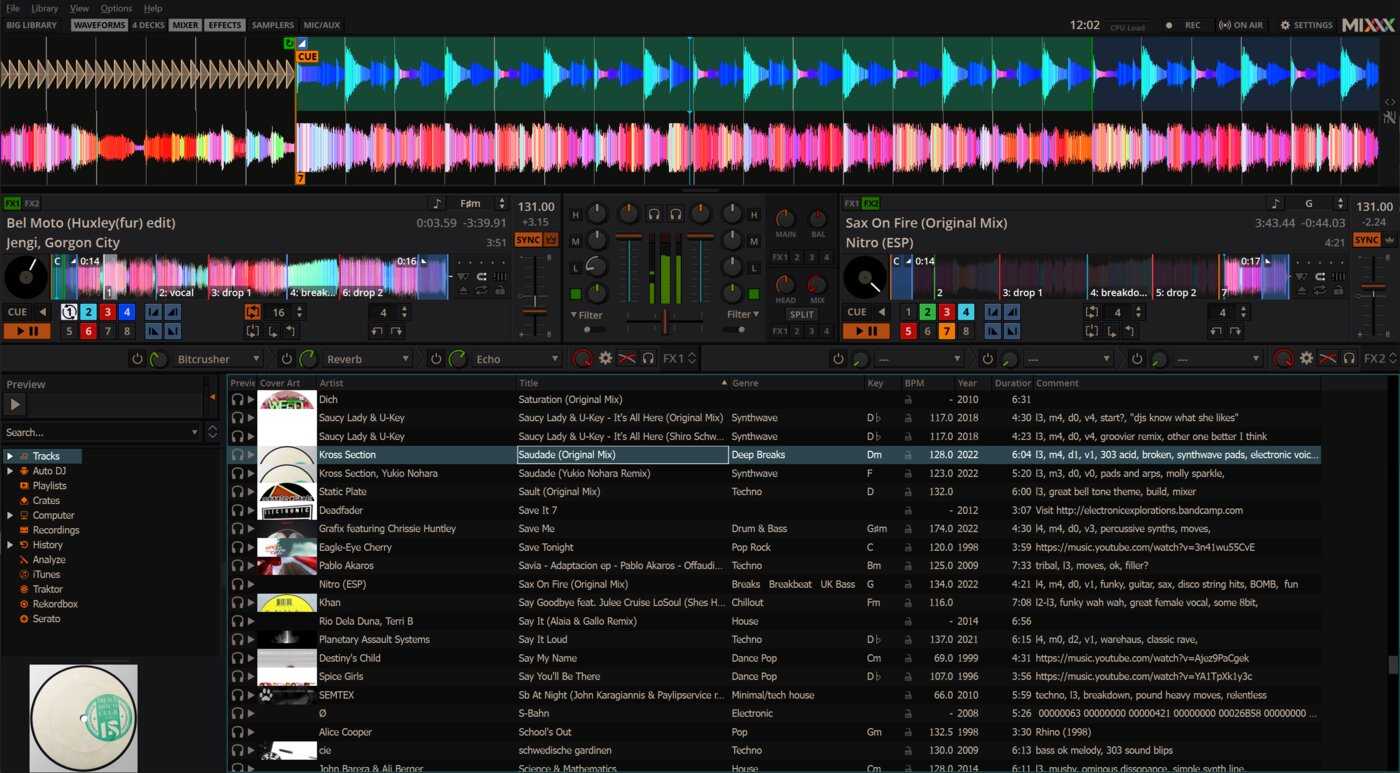
Mixxx is a free, open-source DJ app that covers steps 1, 3 and the mix itself. It detects the BPM and key of every track and shows the key in the library and on the decks. Sync Lock keeps up to four decks at the same tempo.

In Mixxx’s main view, each deck shows the loaded track’s key next to its tempo, and the library below has a Key column you can sort by.
Tempo, pitch and key lock
The tempo fader on a deck changes speed and pitch together, like a turntable. Raising a track by about 6% raises it by a semitone, because each semitone is a frequency ratio of about 1.0595.
A small nudge moves the key as well. Speeding a 124 BPM track up to 128 BPM is a 3.2% change, which puts it about half a semitone sharp. It now sits between two codes, and a long blend with a track in its tagged key can sound slightly out of tune.
Key lock keeps a track’s original pitch while its tempo changes, so its code stays the same. In Mixxx, it is the Keylock toggle in each deck’s options, and the key shown on the deck is the key after any pitch change.
You can also change a key on purpose. Mixxx’s pitch controls move a track by one semitone per click, independently of the tempo. A semitone is seven steps on the wheel, so a 3A track lowered by one semitone plays in 8A and fits an 8A track on the other deck. The MATCH button does this for you. It sets the key to a pitch that allows a harmonic transition from the other deck, and a right-click resets it. Both decks need a detected key.
Pitch shifting colors the sound, more so the further a track moves, and voices show it first. To prepare a pitched or slowed edit before the gig, see how to change speed, tempo and pitch in Audacity.
Key-aware DJ transitions
The distance between two keys decides how long both tracks can play together. Start every transition at the beginning of a phrase. Dance tracks are usually arranged in blocks of 8, 16 or 32 bars, and an entry in the middle of one makes the arrangements collide.
- Blend long and swap the bass for the same key or one number apart. Bring the incoming track in with its low EQ turned down, then trade the bass lines at the next phrase. Lower one low EQ as you raise the other, so only one bass line plays at a time. Mixxx’s EQ kill switches remove a band completely while you hold them.
- Keep the blend short for a letter switch or a diagonal. The notes fit, but the mood changes, so keep the overlap to one phrase and let the new track take over at its first big section.
- Drop to the drums first for a +2. Let the outgoing track reach a breakdown or a drum section, then bring in the new key, so the step up is heard as a lift.
- Cut or echo out for a +7 or keys far apart. Cut on the downbeat of a phrase so the two keys never sound together. Or put an echo on the outgoing track, fade it out, and start the next one under the repeats. Mixxx syncs its time-based effects, Echo included, to the deck tempo.
- Use a filter sweep when the texture changes. A high-pass filter removes the bass of the outgoing track before the new one arrives. Mixxx’s quick effect knob on each deck is a filter by default. The melody still plays above the cutoff, so a clash between two melodies stays audible.
Sound effects help to cover a cut, since a scratch or a cymbal carries little pitch. Club Dj Fx by Audio Hero holds scratches, distorted quick scrubs and synth cymbals.
When key matters less
Key matters most when two pitched parts play at the same time for a while. A vocal over another track’s chords, two melodies or two bass lines will reveal a clash within a bar. Other cases are more forgiving:
- Drum-only intros and outros have little pitch, so they mix with almost any key.
- Quick cuts never play both tracks at once.
- Rap verses carry less melody than sung lines, so the beat underneath decides the clash.
- Breakdowns let you remove one track’s bass before the next key comes in.
Choosing every track because it matches can make a set feel flat after an hour. Energy, genre and the crowd count as much as key, and a well-placed cut can break the wheel on purpose.
Harmonic mixing for producers
The same rules apply in a studio. A loop, a sample or an acapella taken from another song sits in your track without pitch correction when its key matches yours or sits one number away. Loops on MuseHub are tagged with tempo and key, and how to write a topline with loops and beats shows how to build a song from them.
Producers who record a DJ mix or a mashup in a DAW can build the same filter transitions with plugins. Kill Filter by Reyes Amps is a high-pass and low-pass filter in the style of a DJ mixer, with a momentary kill switch and two controls you can map to MIDI.

Zero Sweep Filter by STEMWIRE is a high-pass and low-pass filter that leaves the signal unchanged at zero. A sweep can return all the way to the clean track without clicks.

FAQ
Next steps
Take two tracks you already play back to back and look up both codes. Count how far apart they are, pick the transition from the list above, and rehearse it in Mixxx with key lock on before you play it out.
Get Mixxx and the filters above in one place — download MuseHub free.