Reverse reverb and reverse cymbal: how to make backwards swells
Reverse reverb is the reverb of a sound turned around and placed in front of it, so a word or note swells in out of silence instead of fading away after it. A reverse cymbal does the same with a crash. The ring rises and stops on the downbeat. You make both by reversing audio, in a DAW (digital audio workstation), in Audacity or with the free Reverse Audio tool in your browser.
This guide explains why reverse reverb takes two reversals, then walks through it in any DAW and step by step in Audacity 4, with settings that make the swell land on time. It covers reverse cymbals and how long to make them at common tempos, the plugins that give a reversed tail in real time, and the mistakes that make a swell sound off.
Reverb and delay plugins with reverse modes


What reverse reverb is and why it takes two reversals
Reverse reverb, sometimes called preverb, is a reverb tail that comes before the sound instead of after it. You hear a wash that grows louder and stops the moment the voice or instrument begins.
A reverb can only respond to sound it has already received, so in real time its tail always follows the note. To put the tail first, you turn the recording around, add reverb to the backwards version, then turn the result around again. The tail that followed the reversed recording now leads into the forward one. How reverb forms and decays explains the tail itself.
The diagram follows one trumpet phrase through the method, on a single time line.
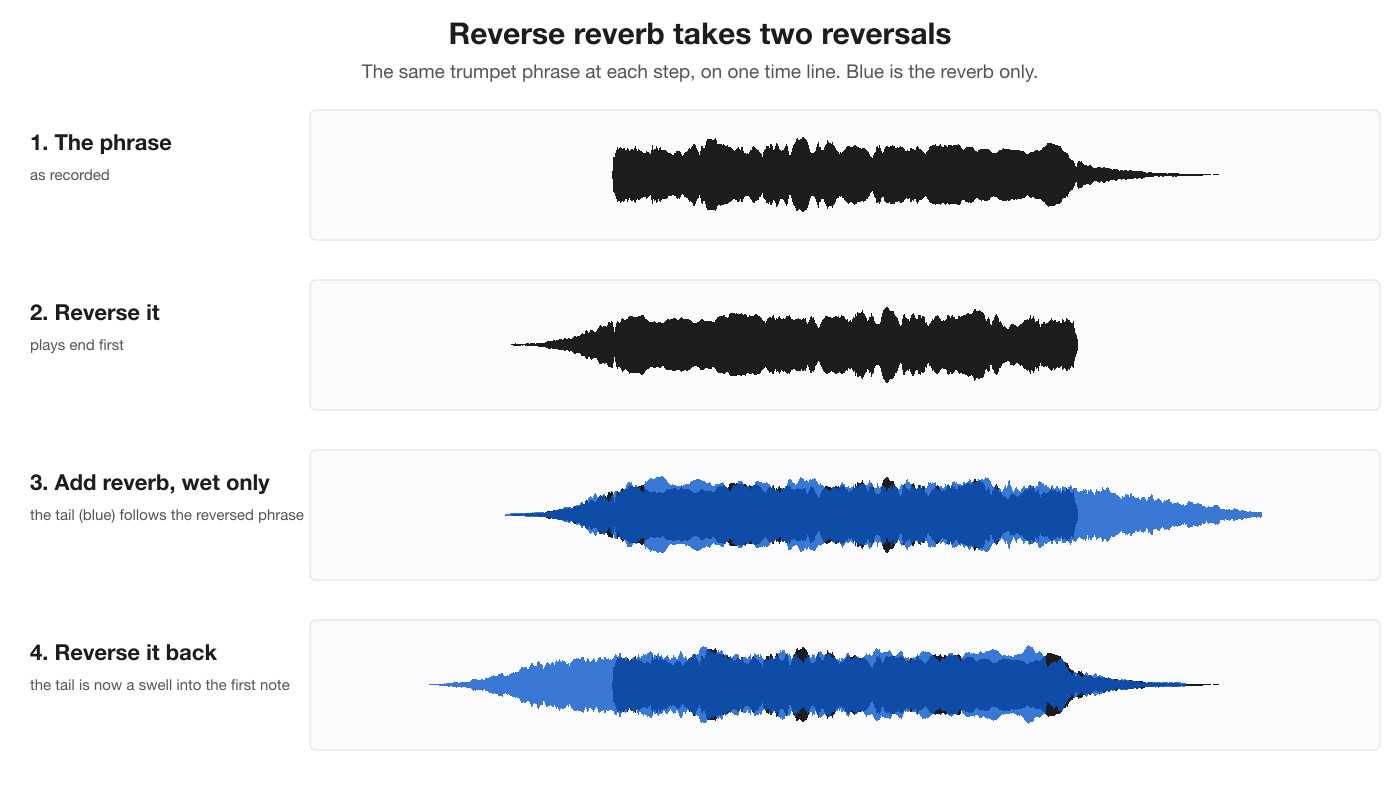
Here is the result. First the phrase dry, then with a reverse-reverb swell under it, made from a 4-second reverb. Listen for the wash that rises out of silence and stops as the first note starts.
Dry, then with the swell
Jimmy Page says he developed the method in 1967 for the Yardbirds’ “Ten Little Indians”, recording the echo of a tape played backwards. Wikipedia’s entry on reverse echo notes a possible earlier example at the end of Lee Mallory’s 1966 single “That’s the Way It’s Gonna Be”. Page used it again on the bridge of Led Zeppelin’s “Whole Lotta Love”. Depeche Mode open “Personal Jesus” with a reverse-reverb vocal, and Galantis swell one into the hook of “Runaway (U&I)”. Film and TV use it on voices for an otherworldly sound, especially in horror.
Reverse effects compared
Several effects get called “reverse”, and each is made a different way.
| Effect | What you hear | How it’s made |
|---|---|---|
| Reversed audio | The sound plays end first, so fades become swells and attacks become sudden stops | One reversal |
| Reverse reverb | A wash that swells into a word or note and stops as it starts | Reverse, add reverb with only the wet signal, reverse again |
| Reverse delay | Echoes that build up to a note, or repeats that play backwards | The same two reversals with a delay, or a delay plugin’s reverse mode |
| Reverse cymbal | A crash that rises and cuts off on the downbeat | One reversal of a crash with a long ring |
| Reverse-tail reverb | A tail that grows after the sound, then cuts off | A setting inside a reverb plugin, in real time |
How to make reverse reverb in any DAW
Every DAW has a reverse command and a way to print an effect to audio, and that is all the method needs.
- Copy the part to a new track. Choose the phrase or the single word that should get the swell, and duplicate it so the original stays untouched.
- Reverse the copy. Use the DAW’s reverse function on the copied clip.
- Add a long reverb at 100% wet. Only the reverb should be printed, never the dry sound. Produce Like a Pro suggests a decay of about 2 to 5 seconds. A longer tail makes the swell slow and vague, and a shorter one rushes it.
- Print the reverb to audio. Bounce, render or freeze the track, and leave a few seconds after the clip so the whole tail fits in the file.
- Reverse the printed reverb. The tail turns into a swell that ends where the phrase begins.
- Line it up and mix it in. Place the end of the swell on the first word or hit, cut the lows with a high-pass filter, and set its level under the dry part.
How to reverse audio in Audacity and make reverse reverb
Audacity 4 has every piece built in. Reverse sits under Effect ▸ Special, with no settings to choose, and Reverb sits under Effect ▸ Delay and reverb, with a Wet only checkbox. Audacity is free on MuseHub. The steps below were tested on Audacity 4.0.2 on macOS.

- Duplicate the vocal track. Open the track’s ⋯ menu and choose Duplicate. All the work happens on the copy.
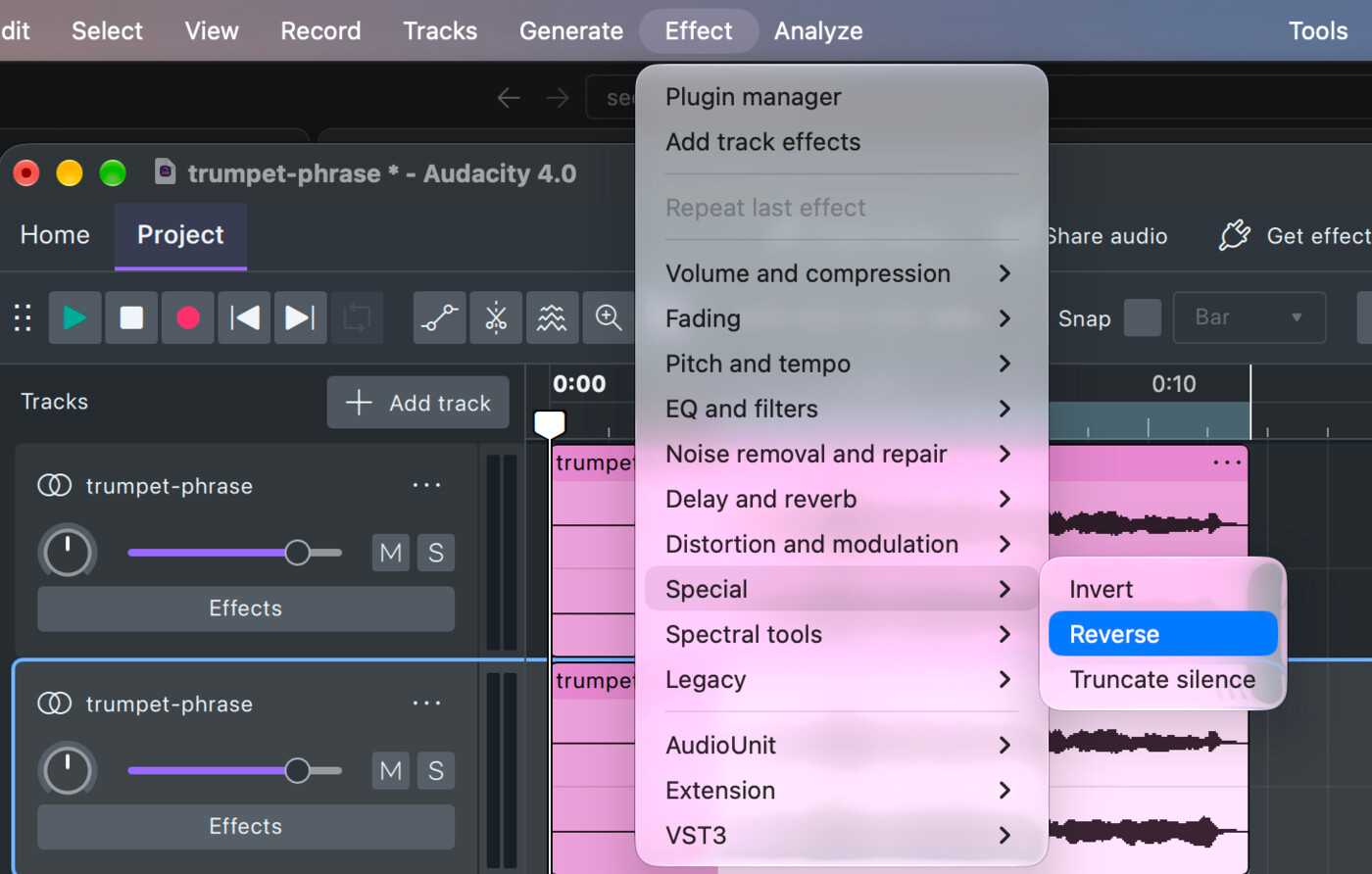
- Reverse the phrase on the copy. Click and drag across the copy to select the phrase, then choose Effect ▸ Special ▸ Reverse. The phrase now plays end first, and Audacity splits it into a clip of its own.
- Give the tail room. Click just after the reversed phrase and add 3 seconds of silence with Generate ▸ Silence. Audacity’s Reverb writes its tail only inside the selection, so the selection needs silence for the tail to fill.
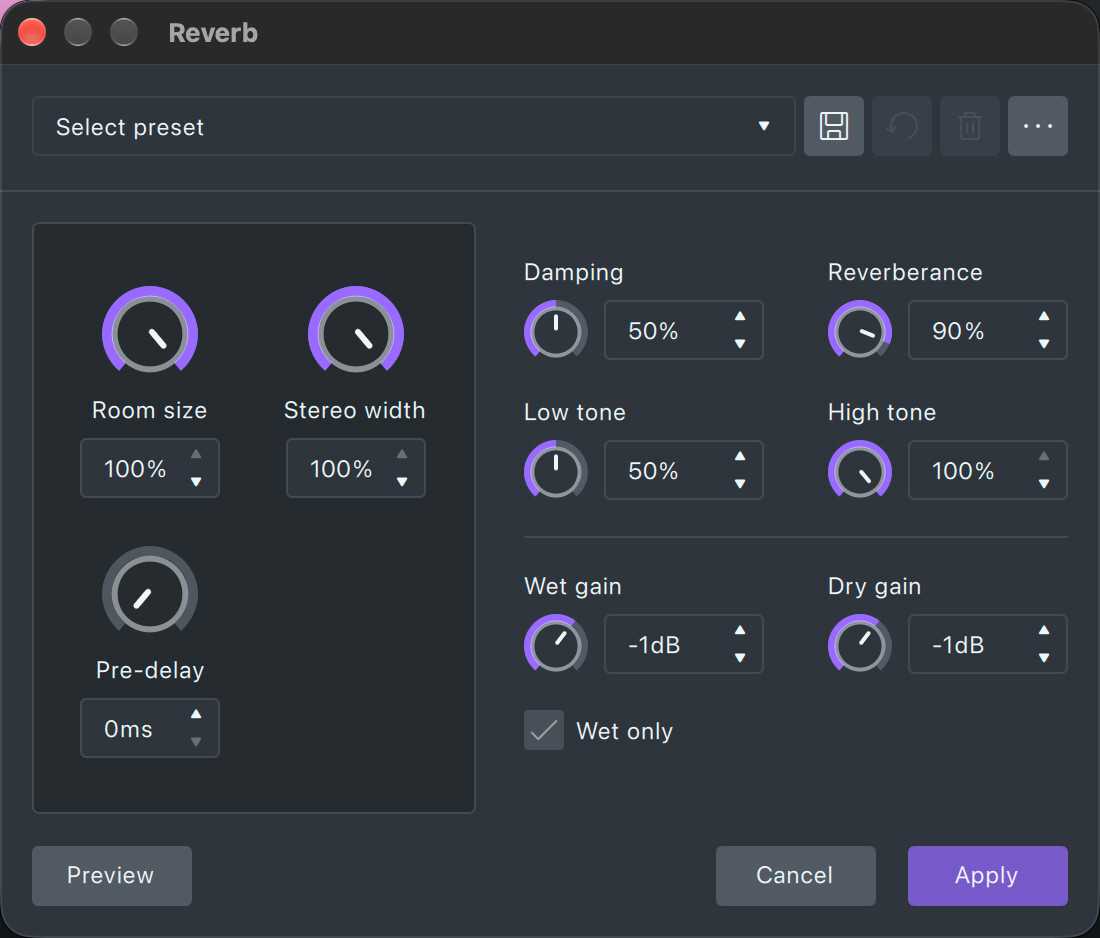
- Add the reverb. Select the reversed phrase together with the silence, choose Effect ▸ Delay and reverb ▸ Reverb and tick Wet only. Start from the settings below, press Preview, then Apply.
- Reverse it back. Keep the same selection and choose Effect ▸ Special ▸ Reverse again. The tail is now a swell at the start of the selection.
- Line it up. Because the selection included the 3 seconds of silence, the second reversal moved the copy 3 seconds later, so the swell ends 3 seconds after the first word. The copy is now several clips, so dragging one by its header moves only that piece. Instead, drag across the first 3 seconds of the copy and choose Edit ▸ Delete and close gap (per track), Shift+Delete. Everything after it on the copy moves 3 seconds earlier, and the swell ends on the first word.
- Keep only the first swell, if you like. The rest of the copy swells into every later word, which suits a ghostly effect. For one swell into the first word, select the copy from the end of that swell onward and press Delete.
- Mix and export. Lower the copy with its volume slider, thin it with Effect ▸ EQ and filters ▸ High-pass filter, then use File ▸ Export audio…, which mixes the tracks into one file.
Here is the recipe on a trumpet phrase. Step 2, with the phrase selected on the copy: Effect ▸ Special ▸ Reverse.
Step 4: the Reverb window with Wet only ticked and the starting settings from the table below.
Step 6 done: on the copy, the swell rises out of silence and ends where the trumpet starts on the original track above it.
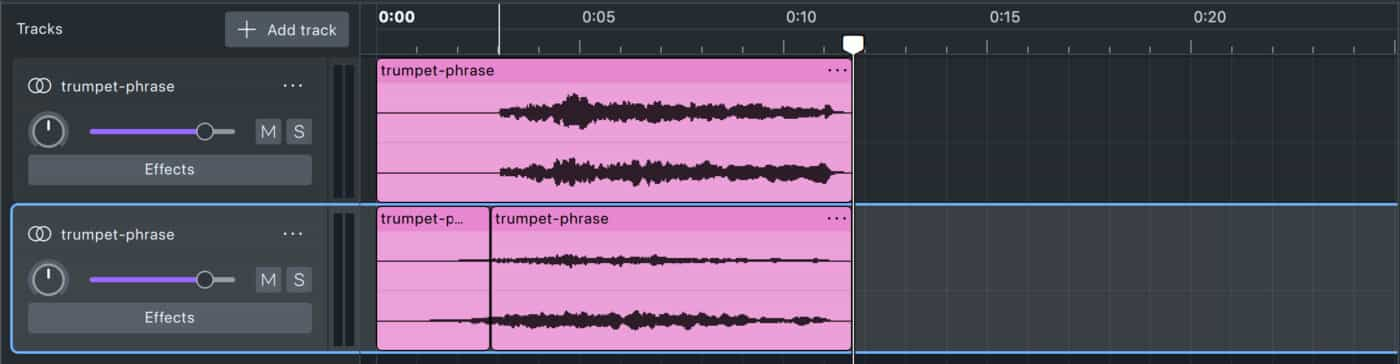
A swell needs empty time before the phrase. If the vocal starts in the first seconds of the project, leave a few seconds before it. How to use effects and plugins in Audacity covers selecting audio, previewing and the difference between Effect-menu and realtime effects.
Working on a phone or in a video editor with no reverse command? The free Reverse Audio tool turns a whole file around in your browser and saves it as a WAV. Reverse the clip there, add a wet-only reverb in any app that offers one, then reverse the result again in the tool.
Starting settings for Audacity’s Reverb
| Setting | Start at | Why |
|---|---|---|
| Wet only | On | The copy holds only the reverb. The dry voice would play backwards over the swell. |
| Room size | 100% | A larger simulated room gives a fuller, smoother swell |
| Reverberance | 80–100% | It sets the tail length, which becomes the length of the swell |
| Pre-delay | 0 ms | After the second reversal, pre-delay turns into a gap between the swell and the word |
| Low tone | 50% | Less low end in the tail keeps the swell from clouding the start of the phrase |
| Wet gain | −1 dB, the default | Set the final level with the track’s volume slider instead |
How to make a reverse cymbal swell
A reverse cymbal is a crash or ride played backwards. Its ring builds up and stops at the point where the cymbal was struck, which makes it a riser into a new section. It takes one reversal, and the work is in the timing.
Here is one: a crash trimmed to one bar at 120 BPM, then the same crash reversed into a normal hit on the downbeat. Listen for the ring growing and stopping exactly where the new hit lands.
Crash, then reversed into a downbeat
- Start with a long crash. Record one, render a single hit from a drum plugin, or take one from a pack. The longer the ring, the longer the rise.
- Trim before you reverse. Cut the file so it starts exactly on the hit and ends where the ring is still faintly audible. Silence left after the ring becomes silence at the start of the reversed file. How to trim and cut audio in Audacity shows the clip handles and fades for this.
- Fade the end of the ring. A short fade-out before reversing becomes a smooth fade-in afterwards, so the swell enters without a click.
- Reverse it. Use Effect ▸ Special ▸ Reverse in Audacity, your DAW’s reverse command, or the Reverse Audio tool.
- Place the end on the downbeat. The loudest point, where the hit used to be, lands on beat one of the new section. Zoom in to set it exactly.
- Soften the stop. A little reverb on the reversed cymbal, or a normal crash hit on the same downbeat, covers the hard cut-off.
The Audio Hero pack below lists light hits, muted crashes and crescendos among its cymbal and gong sounds, so it has material for this.

How long a reverse cymbal should be
A swell sounds deliberate when it lasts a whole number of beats. One beat lasts 60 divided by the tempo in BPM (beats per minute), in seconds. Trim the crash before reversing so its length matches one of these.
| Tempo | 1 beat | 2 beats | 1 bar of 4/4 | 2 bars of 4/4 |
|---|---|---|---|---|
| 70 BPM | 0.86 s | 1.71 s | 3.43 s | 6.86 s |
| 90 BPM | 0.67 s | 1.33 s | 2.67 s | 5.33 s |
| 110 BPM | 0.55 s | 1.09 s | 2.18 s | 4.36 s |
| 128 BPM | 0.47 s | 0.94 s | 1.88 s | 3.75 s |
| 150 BPM | 0.4 s | 0.8 s | 1.6 s | 3.2 s |
| 174 BPM | 0.34 s | 0.69 s | 1.38 s | 2.76 s |
If the ring is shorter than the length you need, pick a longer crash or layer two hits. A slow two-bar rise asks for the most ring.
Reverse reverb plugins and real-time alternatives
A plugin can’t place a tail before a sound it hasn’t heard yet, so a true pre-swell is always printed and reversed. What plugins offer instead is a reversed shape after the sound. The tail grows and then cuts off, which gives the same backwards feel on drums, guitars and synths without leaving the mix.

Halo Reverb by Vitric Audio has eight spaces, and one of them, NONLIN, is for gated and reverse tails. Its DECAY runs from 0.1 to 60 seconds, and FREEZE holds a tail while you play over it.

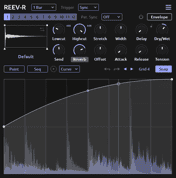
REEV-R by Tilr is a free convolution reverb, which builds its space from a recorded impulse response. It can stretch, trim and reverse that impulse response, and a reversed one gives a tail that rises instead of falling.

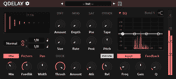
QDelay, also free from Tilr, is a dual delay with stereo, ping-pong, tap and reverse modes, so its repeats can play backwards in real time.
Common reverse reverb mistakes
- Leaving the dry signal in. Without Wet only or 100% wet, the reversed voice is printed too and plays as backwards syllables over the swell.
- No room for the tail. If the reverb has nowhere to ring, the swell starts abruptly instead of growing from silence.
- A swell on every phrase. Used everywhere, it smears the vocal. Save it for an entry, a drop or the first word of a chorus.
- Muddy low end. A long reverb tail carries a lot of bass. High-pass the swell so it doesn’t blur the downbeat it leads into.
- Reversing untrimmed audio. Silence at the end of a file moves to the front, and a swell that seemed aligned arrives late.
Other sounds to play backwards
The same one-reversal trick works on anything with a sharp attack and a long decay. A reversed piano chord swells and stops, which makes a moving ambient bed. A reversed snare gives a short intake of breath before a hit. A single reversed word, low in the mix, adds unease under a scene, and sound designers often play sounds backwards to build horror sound effects.
FAQ
Next steps
For more ways to shape a tail before you reverse it, compare decay, damping and modulation in the best reverb plugins. Get Audacity, the reverb and delay plugins above and the sound packs in one place — download MuseHub free.