DalEQ Core

DalEQ Core

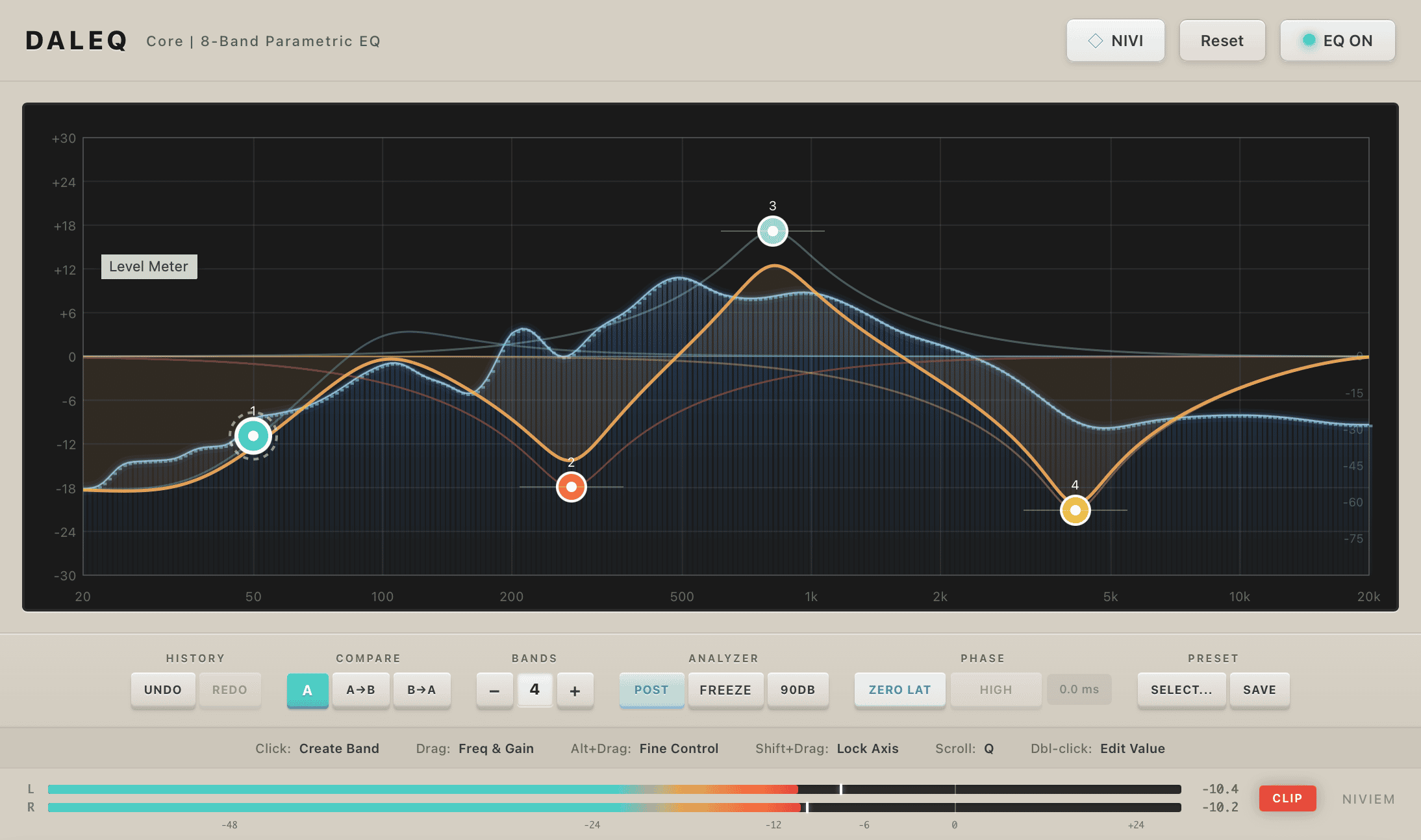
Free 8-band parametric equalizer with Zero-Delay Feedback filters, Linear Phase mode, real-time spectrum analyzer, Mid/Side processing, and Dynamic EQ. Variable slopes from 6-96 dB/oct.

Free
Developer
Platforms
macOSWindows
Release date

Previews

Niviem DalEQ Core is a free professional 8-band parametric equalizer with a premium multi-pass spectrum analyzer and an in-plugin encyclopedia. Built on Zero-Delay Feedback filter topology, it delivers analog-like response with studio-grade precision. It features 9 filter types with variable slopes from 6 to 96 dB/oct, Linear Phase mode for mastering, Mid/Side processing per band, and Dynamic EQ with built-in compression and expansion. The premium spectrum analyzer renders with a five-layer glow line, log-spaced FFT bars and gradient fill — choose from seven accent-colour skins (Teal default plus Amber, Blue, Green, Magenta, Orange and Cool White), continuous Speed / Range / Slope sliders, and 1–8 spatial smoothing passes. Per-frame interpolation keeps the display silky regardless of host buffer size. Every control responds to right-click with Reset to Default and What is this? — the latter opens Nivipedia, an in-plugin encyclopedia with 47 articles covering every control, filter type, mode and concept. Zero-latency processing makes it suitable for both live tracking and mixing.

What DalEQ Core offers

Zero-Delay Feedback Filters: TPT filter topology for accurate analog-like response at all frequencies
Variable Slopes up to 96 dB/oct: Eight slope options from gentle 6 dB/oct to surgical 96 dB/oct
Linear Phase Mode: Zero phase distortion for mastering with selectable quality settings
Per-Band Mid/Side Processing: Each band independently assignable to Stereo, Left, Right, Mid, or Side
Dynamic EQ: Built-in per-band dynamics with threshold, ratio, attack, release, and knee controls
Premium Multi-Pass Spectrum Analyzer: 4096-point FFT with five-layer glow, log-spaced bars and gradient fill. Continuous controls, 1–8 smoothing passes, seven accent-colour skins.

What’s new

  • Premium multi-pass spectrum analyzer. Five-layer glow line, log-spaced FFT bars with bright peak-caps, gradient fill — the same multi-pass aesthetic premium mastering EQs use. Per-frame interpolation keeps the display silky regardless of host buffer size.
  • Seven accent-colour skins for the analyzer rendering — Teal (default), Amber, Blue, Green, Magenta, Orange or Cool White. Pick the look that fits your session.
  • Continuous Speed / Range / Slope sliders in the Analyzer Settings (replacing the previous three-step pickers): Speed 0–1, Range 60–120 dB, Slope 0–6 dB/oct in 0.5 steps. Plus a new Smoothing slider (1–8 spatial passes) and independent Show Bars / Fill Under Curve toggles.
  • Nivipedia — in-plugin encyclopedia. 47 articles across 9 categories covering every control, filter type, mode and concept. Open with the NIVI button in the header, or right-click any control and pick What is this? to jump straight to its entry. Inline learn-more links inside the filter-type picker route to the same articles.
  • Right-click context menu on every chassis control with Reset to Default and What is this?. The browser default right-click menu (Reload, Inspect Element, image-saving) is suppressed on release builds.
  • Allpass filter type now actually works. Selecting Allpass previously routed silently to Tilt Shelf — the ninth filter type was missing from the parameter list. Now routes through the dedicated DSP allpass path.
  • Reaper / Windows fix: Single band handle no longer disappears after switching FX windows or closing the FX chain. Per-PID WebView2 user-data folder eliminates the stale-cache state that caused it.
  • DAW automation lane labels corrected. Filter type names (Tilt Shelf / Low Cut / High Cut / Notch / Bandpass were shifted by one slot) and slope labels ("30/36/42/48" → real "36/48/72/96 dB/oct") now match what the DSP actually plays. Audio was always correct — only the host-side text was wrong.
  • Peak Hold retuned for music with Medium matching the 2-second hold + 20 dB/sec linear-decay industry standard. The setting now properly persists across project save/load (previously reset to Off on every plug-in reopen).
  • Saved projects from earlier builds load unchanged. A state-migration shim preserves every band's filter type and analyzer settings through the upgrade.
1.0.1

FAQ

Reviews

Not enough reviews yet

You may also like