How to add lyrics in MuseScore Studio
To add lyrics in MuseScore Studio, select the first note, press Ctrl+L (Cmd+L on Mac) and type the first syllable. Press - (hyphen) to move to the next syllable of the same word, Space to start a new word, and _ (underscore) to hold a syllable over several notes.
This guide walks through entering lyrics syllable by syllable, adding more verses, fixing and copying lyrics, and hearing them sung back in MuseScore Studio.
Tested on MuseScore Studio 4.7.6 on macOS. Shortcuts are given for Windows and Mac.
Notation tools on MuseHub



How lyrics work in a score
Lyrics in MuseScore Studio belong to notes. Each syllable sits under the note it is sung on, and the score shows two kinds of line between them. A dash joins the syllables of one word, and an underscore line, called an extension line, shows a syllable held over several notes. When one syllable is sung over several pitches, that is a melisma.

How to add lyrics, step by step
- Select the first note that gets a syllable.
- Press Ctrl+L (Mac: Cmd+L), or choose Add ▸ Text ▸ Lyrics. A text box opens under the note.
- Type the first syllable.
Move on, depending on what comes next:
- Next syllable of the same word: press - (hyphen). If the syllable you just typed is sung over several notes, press - again until you reach the note for the next syllable.
- First syllable of a new word: press Space.
- A syllable held over several notes: press _ (underscore, Shift and the hyphen key on a Mac) to move on to the next note without starting a new syllable.
- Keep typing to the end of the line. Shift+Space jumps back one syllable if you need to fix one.
- Press Esc to leave lyrics entry.
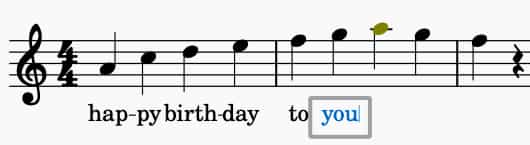
Lyrics entry skips rests. To put a syllable on a rest, select the rest, press Ctrl+L and type.
Typing a hyphen, space or underscore inside a syllable
During lyrics entry, those three keys move the cursor. To type the character itself, add a modifier:
| Character | Windows and Linux | Mac |
|---|---|---|
| Space | Ctrl+Space | Option+Space |
| Hyphen (-) | Ctrl+- | Option+- |
| Underscore (_) | Ctrl+Shift+_ | Option+Shift+_ |
| Line break | Ctrl+Return | Option+Return |
How to add a second verse
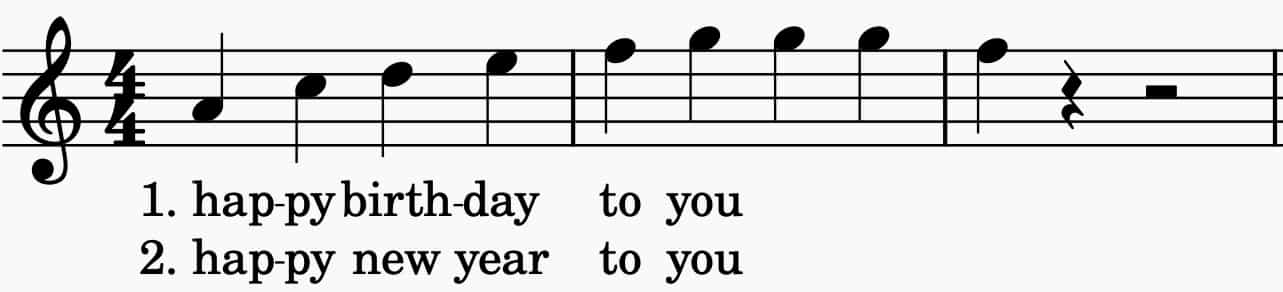
To add verse 2, go back to the first note and enter lyrics again with Ctrl+L. MuseScore Studio places the new line under the last verse. While you type, the Up and Down arrow keys move between verses, and Return moves down to the next verse.
To number your verses, type the number before the first syllable, then Ctrl+Space (Mac: Option+Space) to add a space without moving to the next note. To line the numbers up across verses, turn on Format ▸ Style ▸ Lyrics ▸ Lyrics text ▸ Align verse numbers.
A syllable can be moved to another verse in the Properties panel: select it and change Lyrics ▸ Set to verse.
How to edit, delete and copy lyrics
- Edit: double-click a syllable and type.
- Delete: select the syllables and press Delete or Backspace. Deleting a note also deletes its lyrics.
- Copy: select the lyrics, press Ctrl+C (Mac: Cmd+C), select the first destination note and press Ctrl+V. The lyrics paste into the same verse they came from, so clear the destination first. Copying a range of notes copies their lyrics with them.
Hear the lyrics sung back
MuseScore Studio plays notes back, not words, until you give it a voice that sings. Cantai is a MuseSounds library from Turing Opera Workshop that sings your lyrics inside MuseScore Studio, rendering solo and choir voices from the score with phrasing, dynamics and breath. Once it is installed, you choose Cantai for each voice in the Mixer, and the lyrics you entered are what it sings. Cantai, the MuseSounds library that sings your lyrics walks through the setup and compares it with the other choirs.

Common mistakes
- Pressing Space inside a word. Space starts a new word, so the dash between syllables disappears. Use the hyphen between syllables of one word.
- Pressing Space for a held syllable. Space moves on to a new word. Use the underscore to carry a syllable over the next note.
- Pasting over existing lyrics. Copied lyrics paste into the same verse, so clear the destination first.
FAQ
Next steps
New to MuseScore Studio? MuseScore Studio with Tutorial pairs it with a beginner video course. To turn a printed song into a score first, see how to convert a PDF to MuseScore.
Get Cantai and the rest of MuseSounds in one place — download MuseHub free.