Best channel strip plugins in 2026
A channel strip plugin is the front end of a mixing-console channel rebuilt as one plugin: gain, a gate, EQ, compression and often a little saturation, stacked in a fixed order so you can shape a whole track from a single window. It’s the fastest way to get a consistent, produced sound across every track in a mix instead of loading and matching a separate EQ, compressor and gate on each one. Here are the best channel strip plugins in 2026 — the SSL-modeled classics, the modern assistive strips, and task-focused picks you can install in one click on MuseHub.
This roundup ranks 11 channel strips on sound, workflow and value — the console emulations mixers reach for, plus vocal-, guitar- and quick-enhancement strips — and shows you when a strip beats separate plugins and when it doesn’t.
Channel strips on MuseHub



Top picks at a glance:
- Best all-in-one: Waves Scheps Omni Channel — the deepest do-everything strip (paid).
- Best SSL console tone: Solid State Logic Native Channel Strip 2 (paid).
- Best for vocals: VocalStrip 2 on MuseHub — SSL’s four modules tuned for a voice.
- Best for guitars: Guitarstrip on MuseHub — voiced for electric, acoustic and bass.
- Best budget all-in-one: Airlift on MuseHub — one-knob tone and dynamics.
- Best free: your DAW’s built-in channel strip, or Analog Obsession’s donationware.
How we choose: we rank on sound, workflow and value, tested in real mixes; free and paid on merit, not by brand.
What a channel strip is — and when to use one
A channel strip plugin combines EQ, compression, gating and saturation from a mixing-console channel into one plugin; the best include SSL-modeled strips (Waves, Brainworx) and task-focused options like SSL VocalStrip 2 and Guitarstrip, one-click on MuseHub. The name comes from hardware: on an analog desk, every input runs through a vertical “strip” of the same processors — a preamp (the gain stage that sets level and adds character), a gate (it mutes the signal below a set threshold to cut bleed and noise), an EQ (tone shaping by frequency), a compressor (it evens out level so loud and quiet moments sit closer together), and sometimes saturation. A channel strip plugin puts that same chain in one window.
The reason it speeds up a mix is workflow. You drop one instance on every track and work left to right through the same controls, so the whole session shares a sound and you’re not hunting through separate plugins per track. Committing to one strip also trains your ear faster — fewer choices, quicker decisions.
When does a dedicated tool win instead? When you need surgical work: a dynamic EQ to tame one resonant note, a specific compressor character for parallel drums, or a mastering-grade limiter. A strip is your default per-track workhorse; you reach for a specialist plugin when one problem needs more than the strip’s general-purpose modules give. For that depth, see our roundups of the best EQ plugins and the best compressor plugins.
The best channel strip plugins
1. Waves Scheps Omni Channel
Waves Scheps Omni Channel is the all-in-one strip most engineers reach for first, and it earns that from range rather than one trick. Co-designed with Grammy-winning mixer Andrew Scheps, it stacks a preamp, a gate/expander, two insert slots, a flexible EQ, a compressor and a de-esser in one window — the whole front end of a channel. The reorderable insert slots are the standout: you can put saturation before the compressor on one track and after it on the next without leaving the plugin. Best for a do-everything vocal or instrument chain where you want depth, not just speed. Paid.
2. Solid State Logic Native Channel Strip 2
If one sound defines the channel strip, it’s the SSL 4000 console, and Solid State Logic’s own Native Channel Strip 2 is the direct route to it. You get the 4000-series filter, four-band EQ and the famously fast dynamics section — the punchy, slightly aggressive tone on countless pop, rock and dance records. Version 2 added an external sidechain and higher-resolution metering. It’s paid, made by the company that built the desk, and the pick when you want genuine SSL glue on drums, a bus or a whole mix rather than a modeled approximation.
3. Brainworx bx_console SSL 4000 E
Brainworx takes the SSL 4000 idea further with TMT (Tolerance Modeling Technology), which recreates the tiny component differences between the 72 channels of a real console, so no two tracks sound identically “perfect.” That controlled inconsistency is what makes a mix feel tracked through hardware rather than cloned from one channel. It’s the deepest SSL-style option here, with a full dynamics section, EQ and a virtual-mix-buss feature. Paid, heavier on CPU than most, and the choice when you want console realism across a whole session.
4. VocalStrip 2

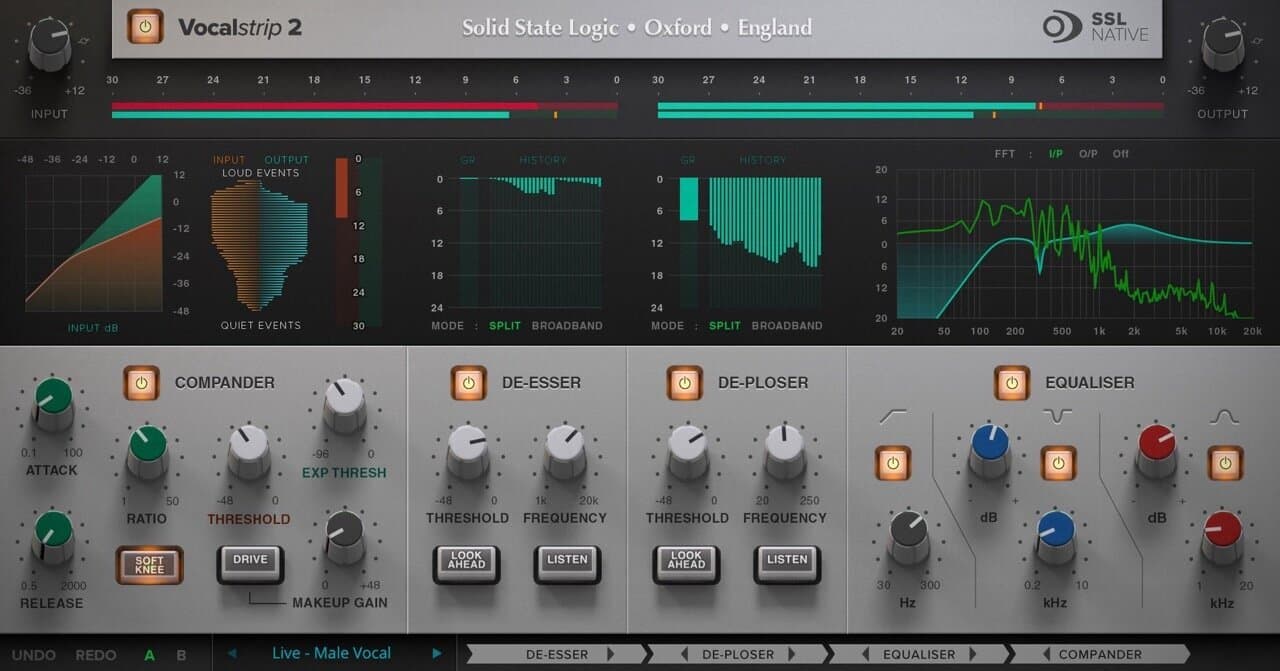
VocalStrip 2 narrows the channel-strip idea to one job: making a lead vocal sit. Rather than a general console channel, Solid State Logic tuned its four modules — a de-esser, EQ, compressor and gate — with vocal ranges and controls, so you shape a voice without picking frequencies and ratios from scratch. That focus is the point: fewer, voice-aware controls get you to a broadcast-ready vocal faster than assembling a chain of separate plugins. Best for singers and podcasters who want a professional vocal in one instance, not a mixing course.
5. Guitarstrip

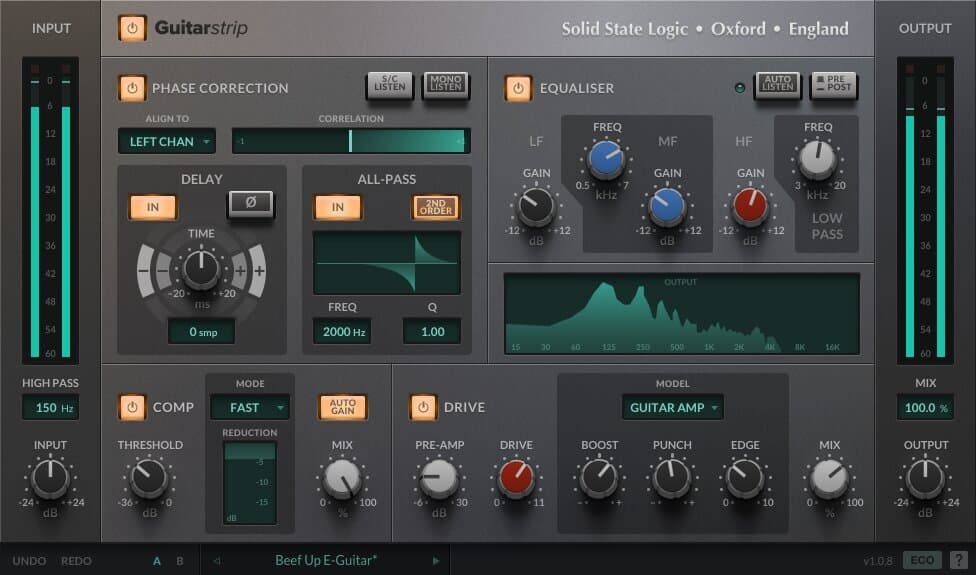
Guitarstrip takes the same task-focused approach to electric, acoustic and bass guitar. Its four modules — filter, EQ, dynamics and a drive stage — are voiced for the problems guitars actually have: boxiness in the low mids, harsh pick attack up top, uneven strumming level. Because Solid State Logic tuned the controls for the instrument, you tame a DI or a mic’d amp in one pass instead of guessing settings on a generic EQ and compressor. Best for producers layering several guitar parts who want each one to sit consistently.
6. iZotope Neutron
iZotope Neutron is the modern, assistive take on a channel strip. Alongside an EQ, compressors, a gate, a transient shaper and an exciter, it adds a Mix Assistant that listens to your track and suggests a starting point, plus a masking meter that shows where two tracks fight for the same frequencies. That analysis is the real value for newer mixers: it turns “something sounds cluttered” into a specific frequency to cut. Best for producers who want a strip that also teaches them where the problems are. Paid, with a cheaper Elements tier.
7. Slate Digital Virtual Mix Rack
Slate Digital’s Virtual Mix Rack (VMR) is a channel strip you build yourself. Instead of a fixed layout, you drag in modules — SSL- and Neve-style EQs, FET and opto compressors, a de-esser, saturation — and reorder them freely, so the strip is exactly the chain you want and nothing you don’t. That modularity is the draw: one plugin covers many console flavors, and you save your own combinations as presets. Best for mixers who like the console workflow but want to swap the EQ or compressor character per source. Paid.
8. Waves CLA MixHub
Waves CLA MixHub rethinks the strip around a whole mix rather than one track. Modeled on Chris Lord-Alge’s SSL desk, it groups tracks into “buckets” of eight and lets you tweak EQ and dynamics across all of them from one window, the way you’d move down a real console. It’s the fastest route to a coherent SSL tone over a full session. Waves also sells the classic SSL E-Channel on its own if you just want one SSL 4000 channel cheaply. Both are paid; MixHub is the pick when speed across many tracks matters more than per-track depth.
9. Native Instruments Solid Mix Series
Native Instruments’ Solid Mix Series is three plugins — Solid EQ, Solid Bus Comp and Solid Dynamics — modeled on a classic SSL-style console and bundled inside Komplete. Used together they make a clean, dependable channel strip, and many producers already own them without realizing it. They aren’t the flashiest models here, but they’re efficient and consistent, which is what you want on every track. Best for Komplete owners who want a solid SSL-flavored strip without buying anything new.
10. Airlift

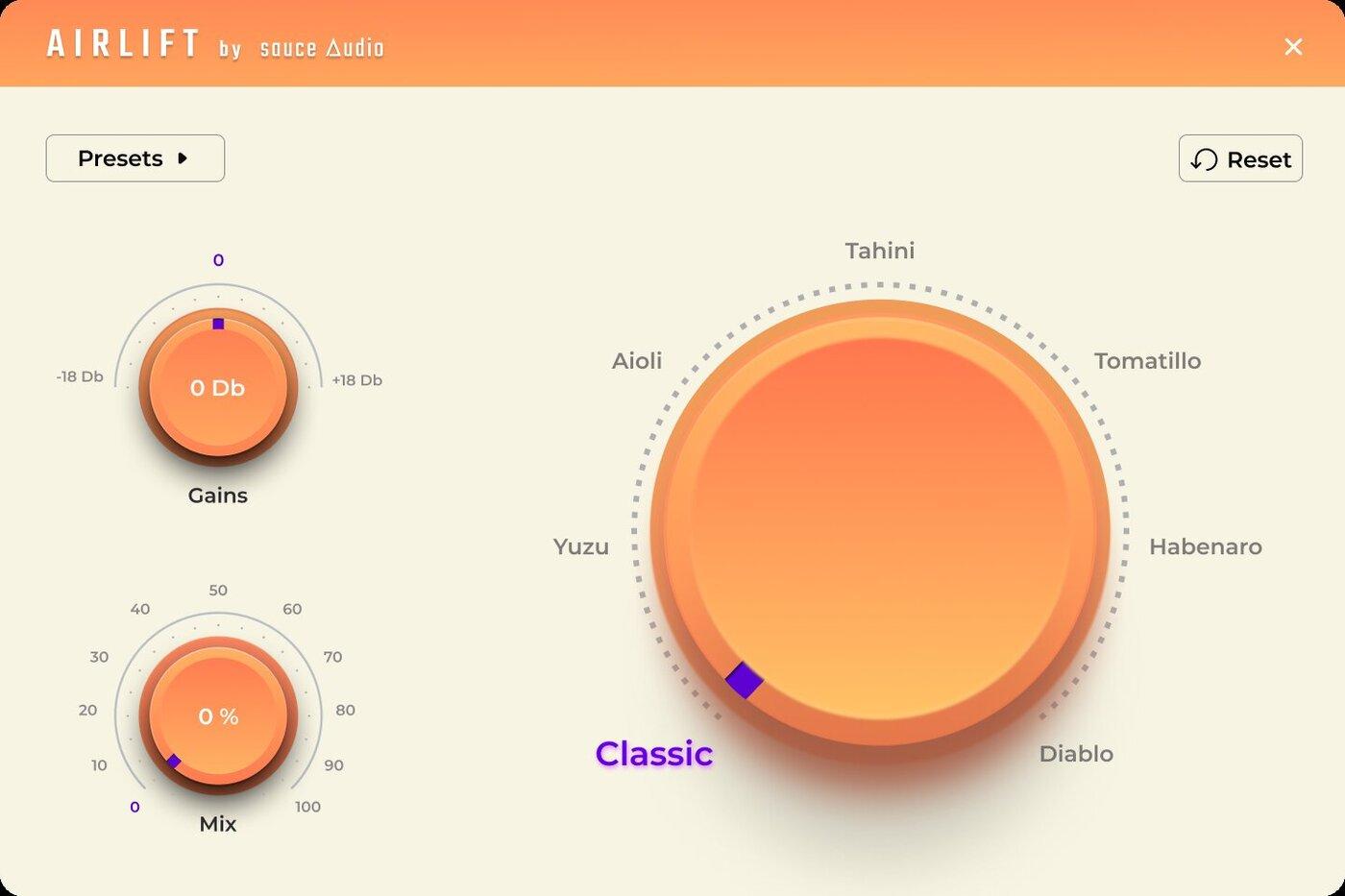
Airlift by Sauce Audio is the quickest all-in-one here: a one-knob enhancer that balances dynamics, shapes tone and adds subtle harmonics as you turn a single control, with genre-specific presets to start from. It isn’t a deep, module-by-module console channel — it’s the opposite bet, that one well-designed macro finishes a track faster than a rack of settings. That makes it the pick when you want a source to sound fuller and more present without learning EQ and compression first. Paid, and far cheaper than the console strips above.
11. Universal Audio console strips
Universal Audio’s console-emulation strips — the SSL E Channel Strip, Neve 88RS and API Vision Channel — are the reference-grade paid options, especially if you record through UAD Apollo hardware, where you can print the tone on the way in with near-zero latency. They also run natively now, without an interface. Each captures a specific desk’s character rather than a generic strip, so you pick by the console sound you’re after. Best for engineers invested in the UAD ecosystem who want authenticated hardware models. Priced per channel.
Best free channel strip
You don’t have to spend anything to work this way. Your DAW almost certainly has a channel strip already: Cubase and Studio One build one into every mixer channel, and Logic’s stock Channel EQ plus Compressor cover the same ground. For an analog flavor, Analog Obsession releases a large set of donationware console and strip-style plugins that are popular on KVR and good enough for finished tracks. Shattered Glass Audio Code Red also has a free version with a scaled-down EQ. “Free” here means price, not quality. And because MuseHub installs free, you can audition the paid strips above in your own DAW before you commit.
How to choose
Start from what you’re mixing. For a deep, do-everything chain, Waves Scheps Omni Channel or a full SSL model (Native Channel Strip 2, Brainworx bx_console) gives you the most control. For one source done fast, go task-focused: VocalStrip 2 on a voice, Guitarstrip on guitars, or Airlift when you just want a track to sound fuller in one move. If you want the strip to help you learn, iZotope Neutron’s analysis points out problems; if you want to build your own, Slate’s Virtual Mix Rack does. Then keep a dedicated EQ and compressor for the surgical jobs a strip isn’t built for. New to putting a mix together? Our guide to mixing music yourself shows where a strip fits in the process.
Comparison table
| Plugin | Type | Price | Best for |
|---|---|---|---|
| Waves Scheps Omni Channel | Full console strip | Paid | The deepest all-in-one chain |
| SSL Native Channel Strip 2 | SSL 4000 model | Paid | Genuine SSL console tone |
| Brainworx bx_console SSL 4000 E | SSL 4000 model (TMT) | Paid | Console realism across a session |
| VocalStrip 2 | Task strip (vocals) | $199.99 | A pro vocal in one instance |
| Guitarstrip | Task strip (guitars) | $199.99 | Electric, acoustic and bass guitar |
| iZotope Neutron | Assistive strip | Paid | Spotting and fixing mix problems |
| Slate Virtual Mix Rack | Modular strip | Paid | Building your own chain |
| Waves CLA MixHub | Multi-channel SSL strip | Paid | Fast, coherent tone across a mix |
| NI Solid Mix Series | SSL-style strip (3 plugins) | Paid | Komplete owners |
| Airlift | One-knob enhancer | $69.99 | Quick tone and dynamics |
| UA console strips | Hardware-modeled strips | Paid | UAD Apollo users |
FAQ
Do I need a channel strip plugin? Not strictly — you can build the same chain from a separate EQ, compressor and gate, and modern DAWs have the CPU to run plenty of them. A channel strip is about workflow: one instance per track, one consistent set of controls, and a shared sound across the mix. Most engineers use a strip as their default and keep specialist plugins for the jobs that need them.
What’s the difference between a channel strip and a separate EQ and compressor? A channel strip bundles the EQ, compressor, gate and often saturation into one plugin with a fixed layout, so you set a whole track from one window. Separate plugins give you more choice — a specific compressor character, a dynamic EQ, a different order — at the cost of speed and consistency. A strip is faster; individual plugins are more surgical.
What’s the best free channel strip plugin? The one already in your DAW: Cubase and Studio One include a mixer channel strip, and Logic’s stock EQ and Compressor do the same job. For an analog character, Analog Obsession’s donationware plugins and the free version of Shattered Glass Audio Code Red are widely used and good enough for released tracks.
What’s the best SSL channel strip plugin? For the authentic desk, Solid State Logic’s own Native Channel Strip 2. For the deepest modeling with channel-to-channel variation, Brainworx bx_console SSL 4000. For a single voice or guitar rather than a whole console, SSL’s task-focused VocalStrip 2 and Guitarstrip get you there faster.
Next steps
- Building a mix from scratch? Read how to mix music yourself.
- Want the full toolkit? See the best mixing plugins.
- Need surgical tone control? Compare the best EQ plugins.
- Browse strips, EQs and dynamics in the MuseHub plugins catalog.
VocalStrip 2, Guitarstrip, Airlift and hundreds more install in one click with MuseHub. Download MuseHub free and try them in your own session before you buy.